audioEnvelopeFollower
R2026bDescription
The audioEnvelopeFollower object estimates the envelope of an input signal over
time.
To generate the estimated envelope:
Create the
audioEnvelopeFollowerobject and set its properties.Call the object with arguments, as if it were a function.
To learn more about how System objects work, see What Are System Objects?
Creation
Description
aEF = audioEnvelopeFolloweraEF, with default property values.
aEF = audioEnvelopeFollower(PropertyName=Value)
For example, aEF =
audioEnvelopeFollower(AttackTime=0.05,ReleaseTime=0.1) creates an audio
envelope follower System object, aEF, with an attack time of 0.05 seconds and a release
time of 0.1 seconds.
Properties
Usage
Syntax
Description
Input Arguments
Output Arguments
Object Functions
To use an object function, specify the
System object as the first input argument. For
example, to release system resources of a System object named obj, use
this syntax:
release(obj)
Examples
Create an audioEnvelopeFollower System object with default parameters.
aEFd = audioEnvelopeFollower
aEFd =
  audioEnvelopeFollower with properties:

      InputMode: 'rms'
     AttackTime: 0.1250
    ReleaseTime: 0.1250
       HoldTime: 0
     SampleRate: 44100
Process an audio signal from a file through the audioEnvelopeFollower System object. Plot the audio signal and its envelope follower.
[x,Fs] = audioread("Ambiance-16-44p1-mono-12secs.wav");
t = (0:numel(x)-1)/Fs;

y1 = aEFd(x);

plot(t,x,t,y1,".--")
xlim([0 t(end)])
xlabel("Time (s)")
ylabel("Amplitude (V)")
legend(["Audio Input" "Envelope Follower (Default)"],Location="northeast")
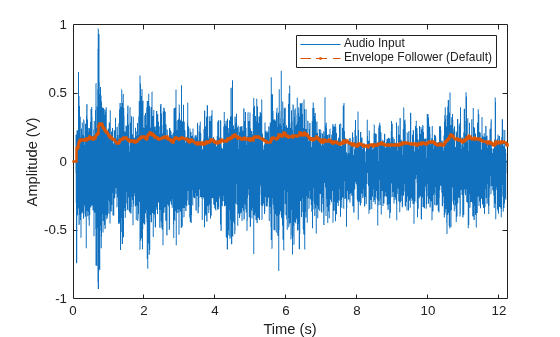
To enhance the envelope follower, adjust the properties of the audioEnvelopeFollower System object. Set the attack time to 10 ms, the release time to 50 ms, and the hold time to 5 ms.
aEFe = audioEnvelopeFollower(SampleRate=Fs, ...
    AttackTime=10e-3,ReleaseTime=50e-3,HoldTime=5e-3)
aEFe =
audioEnvelopeFollower with properties:
InputMode: 'rms'
AttackTime: 0.0100
ReleaseTime: 0.0500
HoldTime: 0.0050
SampleRate: 44100
Process the audio signal through the adjusted envelope follower. Plot the signal and its tracked envelope. The adjusted envelope follower tracks the oscillating amplitudes.
y2 = aEFe(x);

cla
plot(t,x,t,y2,".--")
xlim([0 t(end)])
legend(["Audio Input" "Envelope Follower (Adjusted)"],Location="northeast")
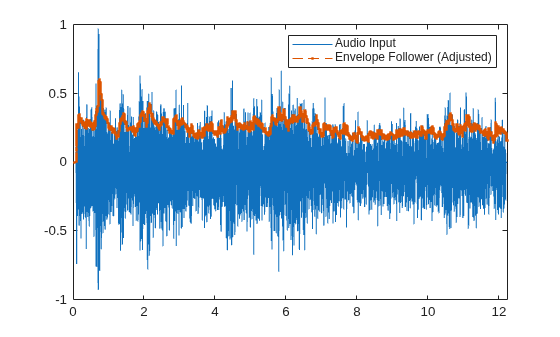
Create an audio enveloper follower at a sample rate of 48000 Hz that tracks the peak amplitude. Set the attack time and hold time to 10 ms.
Fs  = 48e3;
ef = audioEnvelopeFollower(SampleRate=Fs, ...
    AttackTime=10e-3,HoldTime=10e-3,InputMode="peak")
ef =
  audioEnvelopeFollower with properties:

      InputMode: 'peak'
     AttackTime: 0.0100
    ReleaseTime: 0.1250
       HoldTime: 0.0100
     SampleRate: 48000
Generate a two-channel signal that comprises:
A sine-modulated signal, where the amplitude oscillates between 0.5 and 2.5 V. The carrier frequency is 220 Hz.
A square-modulated signal with a 25% duty cycle. The carrier frequency is 55 Hz.
t = (0:2*Fs-1)'/Fs;
C1 = (1.5+sin(2*pi*t)) .* sin(2*pi*220*t);
C2 = (1+square(2*pi*2*t,25))/2 .* sin(2*pi*55*t);
x = [C1 C2];
Estimate the envelope follower from the two-channel input signal. For each channel, plot the input signal and its envelope follower.
y = ef(x);

tiledlayout("vertical")
for c = 1:size(x,2)
    nexttile
    plot(t,x(:,c),"k",t,y(:,c),".-");
    grid on
    xlabel("Time (s)");
    ylabel("Amplitude (V)");
    title("Channel " + c);
    legend(["Input" "Envelope"],Location="southeast");
end
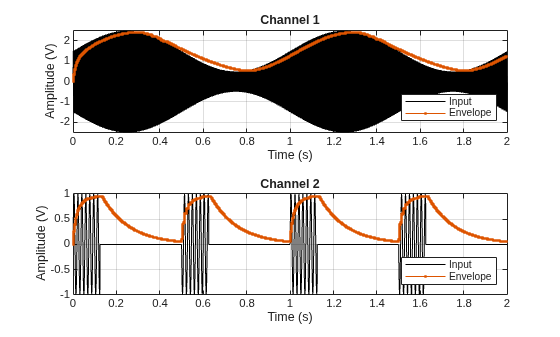
Use the envelope of an audio signal to calculate compression gain values using multiple thresholds and ratios.
Load an audio signal and convert it to mono.
[x,fs] = audioread("RockDrums-48-stereo-11secs.mp3");
x = mean(x,2);
Create an audioEnvelopeFollower System object™ with an attack time of 5 ms, a hold time of 10 ms, and a release time of 20 ms. Specify the sample rate as the sample rate of the audio signal.
ae = audioEnvelopeFollower( ...
    AttackTime=0.005, ...
    HoldTime=0.01,...
    ReleaseTime=0.02, ...
    SampleRate=fs);
Get the RMS envelope of the signal using the envelope follower. Convert the envelope to decibels.
xEnv = ae(x);
xEnvdB = 20*log10(max(xEnv,eps));
Specify two compressor thresholds and ratios: –20 dB and 4:1, and –10 dB and 8:1, respectively.
thresh1 = -20;
thresh2 = -10;
ratio1 = 4;
ratio2 = 8;
Calculate the negative gain applied by the compressor. When the signal exceeds –20 dB, apply gain using a 4:1 ratio.
targetdB1 = xEnvdB;
above_thresh1 = targetdB1 > thresh1;
targetdB1(above_thresh1) = thresh1 + (xEnvdB(above_thresh1) - thresh1) / ratio1;
G1 = targetdB1 - xEnvdB;
If the signal exceeds –10 dB after the initial gain, apply additional compression using the 8:1 ratio.
targetdB2 = targetdB1;
above_thresh2 = targetdB2 > thresh2;
targetdB2(above_thresh2) = thresh2 + (targetdB2(above_thresh2) - thresh2) / ratio2;
G2 = targetdB2 - targetdB1;
Add the gain signals and convert to linear amplitude. Compress the input signal using the calculated gain.
G = G1 + G2;
Glinear = 10.^(G/20);
xComp = x .* Glinear;
Plot the first channel of the input signal and the compressed signal. Additionally plot the gain applied to the input signal. Restrict the x-axis to show two transients.
t = (1:length(x))/fs;
tiledlayout(2,1,TileSpacing="compact")
nexttile
plot(t, [x xComp])
xlim([11.15,11.35])
xlabel('Time (s)')
ylabel('Amplitude')
title('Original and Compressed Signals')
nexttile
plot(t,G)
xlim([11.15,11.35])
xlabel('Time (s)')
ylabel('Gain (dB)')
title('Gain Signal')
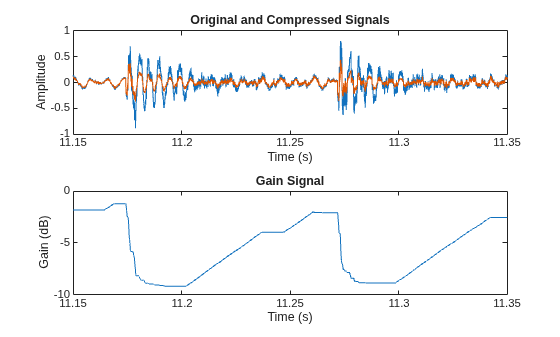
Algorithms
Assume an input signal x[n] and its envelope y[n] with these parameters:
Fs is the sample rate.
ta is the attack time.
tr is the release time.
th is the hold time.
The attack and release times correspond to the time in seconds that y[n] takes to go to 1 – e–1 (~63.2%) of its final value. The release time count, tc, is the time elapsed since x is less than y. Then, the attack-time coefficient αa and the release-time coefficient αr are these:
αa = e–1/(Fsta)
αr = e–1/(Fstr)
Depending on the input signal preprocessing mode, the table lists the preprocessed input xp[n], preprocessed envelope yp[n], and envelope y[n].
| Preprocessing Mode | Preprocessed Input | Preprocessed Envelope | Envelope |
|---|---|---|---|
| Root mean square (RMS) | xp[n] = (x[n])2 | y[n] = √(yp[n]) | |
| Peak | xp[n] = |x[n]| | y[n] = yp[n] | |
| Bypass | xp[n] = x[n] | y[n] = yp[n] |
Extended Capabilities
Version History
Introduced in R2026b

