Accelerate Link-Level Simulations with Parallel Processing
R2026bThis example shows how to accelerate 5G PDSCH link-level simulations by using a cluster of workers from a parallel pool.
Introduction
Link-level simulations require a large number of frames to provide statistically valid results. Therefore, these simulations can take a long time to run. Parallel computing is a common technique to speed up these simulations. This example shows how to run link-level simulations by using MATLAB® workers from a parallel pool (requires Parallel Computing Toolbox™).
Parallel Computing Toolbox enables you to use the full processing power of multicore desktops by executing applications on workers (MATLAB computational engines) that run locally. Without changing the code, you can run the same applications on clusters or clouds.
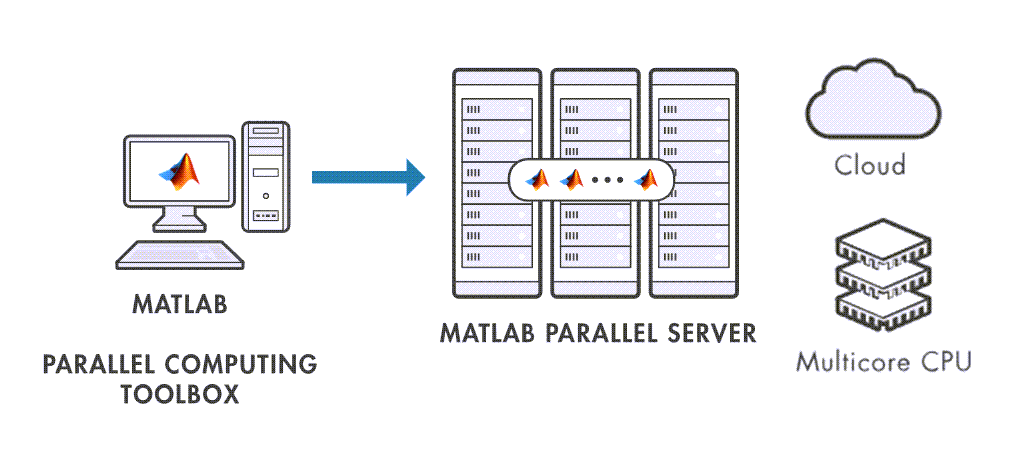
For an example of how to discover and set up a cluster of workers, see the Scale Up from Desktop to Cluster (Parallel Computing Toolbox) example.
To obtain statistically valid results, this example uses multiple channel seeds per SNR point. This is particularly important at low Doppler shifts, where channel conditions change slowly over time and multiple seeds are required to capture a diverse set of channel realizations.
Parallelization Strategy
This example distributes work across parallel workers by splitting the simulation into independent trials. Each trial simulates a specific SNR point with a specific channel seed for a fixed number of slots. The example creates all combinations of SNR points and channel seeds, then assigns each combination to a worker in a parfor-loop. Each worker runs a complete PDSCH link simulation for its assigned combination and returns the results. After all workers finish, the example aggregates the results by SNR point to compute throughput metrics.
This approach has two key parameters:
numTrialsPerSNRPoint— Number of channel seeds per SNR point. More trials provide better statistical coverage.numSlotsPerTrial— Number of slots each worker simulates. When HARQ is enabled, each trial needs enough slots for all HARQ processes to complete their RV sequence at least once, preventing the initial transient, before steady-state operation from skewing the throughput statistics. While additional RV cycles per trial improve accuracy, they also increase simulation time and reduce parallel efficiency. For high parallel efficiency, keep trials as short as possible so that work is evenly distributed across workers.
Set Simulation Parameters
Specify the SNR points.
simParameters = struct();                                                        % Simulation parameters structure
simParameters.SNRdB = 6:4:26;                                                    % SNR range (dB)
Configure the carrier, PDSCH, and DL-SCH-related parameters.
% Set carrier parameters
simParameters.Carrier = nrCarrierConfig;                                         % Carrier resource grid configuration
simParameters.Carrier.NSizeGrid = 51;                                            % Bandwidth in number of resource blocks
simParameters.Carrier.SubcarrierSpacing = 30;                                    % Subcarrier spacing

% Set PDSCH parameters
simParameters.PDSCH = nrPDSCHConfig;                                             % PDSCH definition

% Define PDSCH time-frequency resource allocation per slot to be full grid (single full grid BWP) and number of layers
simParameters.PDSCH.PRBSet = 0:simParameters.Carrier.NSizeGrid-1;                % PDSCH PRB allocation
simParameters.PDSCH.SymbolAllocation = [0,simParameters.Carrier.SymbolsPerSlot]; % Starting symbol and number of symbols of each PDSCH allocation
simParameters.PDSCH.NumLayers = 1;                                               % Number of PDSCH transmission layers

% This structure is to hold additional simulation parameters for the DL-SCH and PDSCH
simParameters.PDSCHExtension = struct();

% Define codeword modulation and target coding rate
simParameters.PDSCH.Modulation = "16QAM";                                        % "QPSK", "16QAM", "64QAM", "256QAM", "1024QAM"
simParameters.PDSCHExtension.TargetCodeRate = 490/1024;                          % Code rate used to calculate transport block sizes

% The number of codewords is directly dependent on the number of layers so ensure that layers are set first before getting the codeword number
% Assume the same modulation and target code rate is used by both codewords
if simParameters.PDSCH.NumCodewords > 1                                          % Multicodeword transmission (when number of layers is > 4)
    simParameters.PDSCH.Modulation = repmat({simParameters.PDSCH.Modulation},1,2);
    simParameters.PDSCHExtension.TargetCodeRate = repmat(simParameters.PDSCHExtension.TargetCodeRate,1,2);
end

% HARQ process parameters
simParameters.PDSCHExtension.NHARQProcesses = 16;                                % Number of parallel HARQ processes to use
simParameters.PDSCHExtension.RVSequence = [0 2 3 1];                             % RV sequence
simParameters.PDSCHExtension.EnableHARQ = true;                                  % Enable retransmissions for each process, using RV sequence [0,2,3,1]

% PDSCH PRB bundling (TS 38.214 Section 5.1.2.3)
simParameters.PDSCHExtension.PRGBundleSize = [];                                 % Any positive power of 2, or [] to signify "wideband"

% LDPC decoder parameters
simParameters.PDSCHExtension.LDPCDecodingAlgorithm = "Normalized min-sum";
simParameters.PDSCHExtension.MaximumLDPCIterationCount = 20;
Set the number of transmit and receive antennas, and the channel parameters.
% Number of antennas
simParameters.NTxAnts = 1;                                                       % Number of antennas (1,2,4,8,16,32,64,128,256,512,1024) >= NumLayers
simParameters.NRxAnts = 1;

% Define the general CDL propagation channel parameters
simParameters.DelayProfile = "CDL-A";
simParameters.DelaySpread = 10e-9;
simParameters.MaximumDopplerShift = 5;

% Perfect channel estimation flag: perfect (true) or practical (false)
simParameters.PerfectChannelEstimation = true;

% Cross-check the PDSCH layering against the channel geometry
validateNumLayers(simParameters.PDSCH.NumLayers,simParameters.NTxAnts,simParameters.NRxAnts);
Configure Parallelization
By default, this example enables parallel execution. Alternatively, you can disable parallel execution, for example, when debugging your code.
simParameters.enableParallelism = true;
Initialize the global random number stream. This controls the random number generator outside the parfor-loop.
rng("default")Create a separate Threefry stream with substream support. Then each worker can use an independent substream to ensure reproducible results in the parfor-loop. For more information, see Control Random Number Streams on Workers (Parallel Computing Toolbox) and Repeat Random Numbers in parfor-Loops (Parallel Computing Toolbox).
randStr = RandStream("Threefry","Seed",0); % use a generator with substream support
Create a parallel pool and get the number of workers if parallel execution is enabled.
[maxNumWorkers,constantStream] = createParallelPool(simParameters.enableParallelism,randStr);
Set the Number of Trials per SNR point
Set the number of trials per SNR point, where each trial uses a different channel seed to provide an independent channel realization.
numTrialsPerSNRPoint = 100;
% Generate channel seeds
chSeeds = randi([0 2^32-1],numTrialsPerSNRPoint,1);
Set the number of slots per trial to simulate. This example sets numSlotsPerTrial such that each trial simulates enough slots for every HARQ process to complete a full redundancy version sequence. The overall number of slots per SNR point to simulate is numSlotsPerTrial × numTrialsPerSNRPoint.
numSlotsPerTrial = simParameters.PDSCHExtension.NHARQProcesses*numel(simParameters.PDSCHExtension.RVSequence);
Depending on your Doppler shift and HARQ configuration, you may need to adjust the values of numTrialsPerSNRPoint and numSlotsPerTrial. For example, when HARQ is disabled, you can set numSlotsPerTrial to 1 slot because there are no retransmissions. However, you need to increase numTrialsPerSNRPoint to ensure enough channel realizations are simulated to capture the statistical behavior of the channel. Similarly, at low Doppler shifts, the channel does not change much during a single realization, therefore more trials per SNR point are needed to capture sufficient channel variability.
Create Combination of Parameters to Simulate
Create all combinations of SNR points and channel seeds in the matrix parameterCombinations. The table parameterCombinationsTable provides the same data in table form for easier inspection.
[parameterCombinations,parameterCombinationsTable] = allCombinations(simParameters.SNRdB(:),chSeeds);
Simulate PDSCH Throughput
The simulation is based on a parallel loop that uses the workers from the parallel pool. If parallel execution is disabled, maxNumWorkers is set to 0, which converts the parfor-loop into a regular for-loop.
To debug the simulation code, disable parallelism by setting enableParallelism to false. Note that you cannot set breakpoints in the body of a parfor-loop, but you can set them in functions called from within it.
% Create empty results table
resultTable = table(Size=[size(parameterCombinations,1) 7],...
    VariableNames=["SNR","chSeed","numSlots","numBits","numCorrectBits","numTrBlks","numTrBlkErrors"],...
    VariableTypes=["double","uint32","uint32","uint32","uint32","uint32","uint32"]);

allsnrdB = parameterCombinations(:,1);
allchSeed = parameterCombinations(:,2);

% Parallel processing, worker parfor-loop
parfor (pforIdx = 1:size(parameterCombinations,1),maxNumWorkers)
    % Set random streams to ensure repeatability
    % Use substreams in the generator so each worker uses mutually independent streams
    stream = constantStream.Value;      % Extract the stream from the Constant
    stream.Substream = pforIdx;         % Set substream value = parfor index
    RandStream.setGlobalStream(stream); % Set global stream per worker

    % Per worker processing: PDSCH link
    snrdB = allsnrdB(pforIdx);
    chSeed = allchSeed(pforIdx);
    linkSimResults = pdschLink(simParameters,snrdB,chSeed,numSlotsPerTrial);

    % Store results
    resultTable(pforIdx,:) = table(snrdB,chSeed,linkSimResults.NumSlots, ...
        linkSimResults.NumBits,linkSimResults.NumCorrectBits,linkSimResults.NumTrBlks,linkSimResults.NumTrBlkErrors);
end % parfor
Summarize Throughput Simulation Results
Aggregate per trial results by SNR point and compute throughput metrics.
simThPut = processResults(resultTable,simParameters.Carrier.SlotsPerFrame);
disp(simThPut)
    SNR (dB)    NumSlots    NumTrBlks    NumFrames    Throughput (Mbps)    Throughput (%)
    ________    ________    _________    _________    _________________    ______________

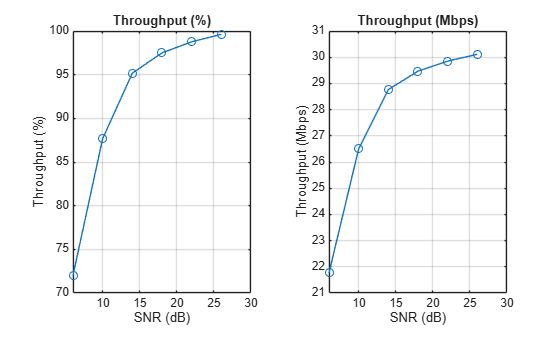
        6         6400        6400          320            21.771              72.031
       10         6400        6400          320            26.503              87.688
       14         6400        6400          320            28.765              95.172
       18         6400        6400          320            29.468                97.5
       22         6400        6400          320            29.851              98.766
       26         6400        6400          320            30.111              99.625
Plot the throughput against the SNR.
tiledlayout(1,2); nexttile
plot(simThPut.("SNR (dB)"),simThPut.("Throughput (%)"),"o-");grid on
title("Throughput (%)");
xlabel("SNR (dB)"); ylabel("Throughput (%)")
nexttile
plot(simThPut.("SNR (dB)"),simThPut.("Throughput (Mbps)"),"o-");grid on
title("Throughput (Mbps)");
xlabel("SNR (dB)"); ylabel("Throughput (Mbps)")
Accelerate Simulation
You can reduce the simulation time by increasing the number of workers either on your local machine or in a cluster. You do not need to set the number of workers in the example code. To configure the number of workers, on the MATLAB® Home tab in the Environment section, select Parallel > Parallel Settings, then open the Cluster Profile Manager window. For more information on how to discover and set up a cluster of workers, see the Scale Up from Desktop to Cluster (Parallel Computing Toolbox) example.
The table shows the results of running the example with different worker configurations.
No Parallelism | 16 Workers | 48 Workers | |
|---|---|---|---|
Simulation Time | 18 minutes | 2 minutes | 1 minute |
When running without parallelism, MATLAB implicitly uses multithreading to accelerate built-in operations. In contrast, when parallelism is enabled, each worker typically runs single-threaded, meaning the effective speedup is measured against an already multi-threaded baseline rather than a single-core one. Additionally, not all trials have identical execution times, so some workers finish before others, leaving resources idle until the slowest trial completes. Finally, there is a communication overhead as the number of workers increases. Together, these factors explain why 48 workers do not yield a 48x speedup.
To visualize the distribution of workloads across workers and measure parallel efficiency, you can use the Pool Dashboard (Pool Dashboard (Parallel Computing Toolbox)).
Local Functions
function [maxNumWorkers,constantStream] = createParallelPool(enableParallelism,randStr)
%CREATEPARALLELPOOL Set up parallel pool and shared random stream.
%
%   [NWORKERS, CONSTSTREAM] = CREATEPARALLELPOOL(ENABLEPARALLELISM, RANDSTR)
%   creates or reuses a parallel pool if parallelism is enabled.
%
%   Outputs:
%       NWORKERS    Number of workers (0 if running in serial).
%       CONSTSTREAM parallel.pool.Constant wrapping RANDSTR (or struct with
%                   field 'Value' in serial mode).
%
%   Falls back to serial execution if Parallel Computing Toolbox is unavailable or if parallelism is disabled.

    if (enableParallelism && canUseParallelPool)
        pool = gcp; % create parallel pool, requires Parallel Computing Toolbox
        maxNumWorkers = pool.NumWorkers;
        constantStream = parallel.pool.Constant(randStr); % create a constant random stream to avoid unnecessary copying of the random stream multiple times to each worker
    else
        if (~canUseParallelPool && enableParallelism)
            warning("Ignoring the value of enableParallelism ("+enableParallelism+")"+newline+ ...
                "The simulation runs using serial execution."+newline+"For parallel execution, you need a Parallel Computing Toolbox(TM) license.")
        end
        maxNumWorkers = 0; % Used to convert the parfor-loop into a for-loop
        constantStream = struct("Value", randStr);
    end
end

function [combos,combosTable] = allCombinations(varargin)
% ALLCOMBINATIONS Generate the Cartesian product of N parameter vectors.
% Usage:
%   [combos, combosTable] = allCombinations(P1, P2, P3, ...)
% Inputs:
%   Each Pn is a row or column vector (numeric or logical).
% Outputs:
%   combos      - (prod(numel(Pn)))-by-N matrix, where N = number of
%                  inputs. Each row is one combination of input values.
%   combosTable - table representation of combos.

    n = nargin;
    assert(n >= 1, "Provide at least one parameter vector.");

    % Ensure each input is a column vector
    params = cellfun(@(v) v(:), varargin, "UniformOutput", false);

    % Create N-D grids
    grids = cell(1, n);
    [grids{:}] = ndgrid(params{:});  % fully vectorized

    % Flatten each grid to a column and concatenate into final matrix
    cols = cellfun(@(g) g(:), grids, "UniformOutput", false);
    combos = [cols{:}];
    combosTable = table(cols{:});
end

function results = pdschLink(simParameters,snrdB,chSeed,numSlots)
% PDSCHLINK Simulate a PDSCH link for a single SNR point and channel seed.
%   results = pdschLink(simParameters, snrdB, chSeed, numSlots) runs a
%   PDSCH link simulation over numSlots slots at the specified SNR (in dB)
%   using the given channel seed. Returns a struct with fields:
%     NumSlots       - number of simulated slots
%     NumBits        - total transmitted bits
%     NumCorrectBits - correctly decoded bits
%     NumTrBlks      - total transport blocks
%     NumTrBlkErrors - errored transport blocks
%
%   Inputs:
%     simParameters - struct containing Carrier, PDSCH, PDSCHExtension,
%                     NTxAnts, NRxAnts, and channel parameters
%     snrdB         - SNR in dB for this trial
%     chSeed        - channel seed for this trial
%     numSlots      - number of slots to simulate

    % Take copies of channel-level parameters to simplify subsequent parameter referencing
    carrier = simParameters.Carrier;
    pdsch = simParameters.PDSCH;
    pdschextra = simParameters.PDSCHExtension;

    % Results storage
    results = struct(NumSlots=0,NumBits=0,NumCorrectBits=0,NumTrBlks=0,NumTrBlkErrors=0);

    % Create DL-SCH encoder/decoder
    [encodeDLSCH,decodeDLSCH] = dlschEncoderDecoder(pdschextra);

    % OFDM waveform information
    ofdmInfo = nrOFDMInfo(carrier);

    % Create CDL channel
    channel = nrCDLChannel;
    channel = hArrayGeometry(channel,simParameters.NTxAnts,simParameters.NRxAnts);
    nRxAnts = prod(channel.ReceiveAntennaArray.Size);
    channel.DelayProfile = simParameters.DelayProfile;
    channel.DelaySpread = simParameters.DelaySpread;
    channel.MaximumDopplerShift = simParameters.MaximumDopplerShift;
    channel.SampleRate = ofdmInfo.SampleRate;
    channel.ChannelResponseOutput = "ofdm-response";
    % New seed for each worker, but the same for each SNR point so they all
    % experience the same channel realization.
    channel.Seed = chSeed;

    chInfo = info(channel);
    maxChDelay = chInfo.MaximumChannelDelay;

    % Perfect or practical channel estimation
    perfectChannelEstimation = simParameters.PerfectChannelEstimation;

    % Set up redundancy version (RV) sequence for all HARQ processes
    if simParameters.PDSCHExtension.EnableHARQ
        rvSeq = simParameters.PDSCHExtension.RVSequence;
    else
        % HARQ disabled - single transmission with RV=0, no retransmissions
        rvSeq = 0;
    end

    % Noise power calculation
    SNR = 10^(snrdB/10); % Calculate linear SNR
    N0 = 1/sqrt(ofdmInfo.Nfft*SNR*nRxAnts);
    % Get noise power per resource element (RE) from noise power in the
    % time domain
    nVar = N0^2*ofdmInfo.Nfft;

    % Specify the fixed order in which we cycle through the HARQ process IDs
    harqSequence = 0:pdschextra.NHARQProcesses-1;

    % Initialize the state of all HARQ processes
    harqEntity = HARQEntity(harqSequence,rvSeq,pdsch.NumCodewords);

    % Obtain a precoding matrix (wtx) to be used in the transmission of the
    % first transport block
    estChannelGrid = getInitialChannelEstimate(carrier,channel);
    wtx = hSVDPrecoders(carrier,pdsch,estChannelGrid,pdschextra.PRGBundleSize);

    % Process all the slots per worker
    for nSlot = 0:numSlots-1

        % New slot number
        carrier.NSlot = nSlot;

        % Generate new data and DL-SCH encode
        [codedTrBlocks,trBlkSizes,codedBlkLen] = getDLSCHCodeword(encodeDLSCH,carrier,pdsch,pdschextra.TargetCodeRate,harqEntity);

        % PDSCH modulation of codeword(s), MIMO precoding and OFDM
        txWaveform = hPDSCHTransmit(carrier,pdsch,codedTrBlocks,wtx);

        % Pass data through channel model. Append zeros at the end of the
        % transmitted waveform to flush channel content. The channel model
        % also returns the OFDM channel response and timing offset for the
        % specified carrier.
        txWaveform = [txWaveform; zeros(maxChDelay,size(txWaveform,2))];
        [rxWaveform,ofdmResponse,timingOffset] = channel(txWaveform,carrier);

        % Add noise
        noise = N0*randn(size(rxWaveform),"like",rxWaveform);
        rxWaveform = rxWaveform + noise;

        % Synchronization, OFDM demodulation, channel estimation,
        % equalization, and PDSCH demodulation
        chEstInfo = channelEstimateConfig(ofdmResponse,timingOffset,nVar,perfectChannelEstimation);
        [dlschLLRs,wtx] = hPDSCHReceive(carrier,pdsch,pdschextra,rxWaveform,wtx,chEstInfo);

        % Decode the DL-SCH transport channel
        [~,blkerr] = decodeDLSCHTrBlk(decodeDLSCH,dlschLLRs,pdsch,trBlkSizes,codedBlkLen,harqEntity);

        % SNR point simulation results
        results.NumSlots = results.NumSlots+1;
        results.NumBits = results.NumBits+sum(trBlkSizes);
        results.NumCorrectBits = results.NumCorrectBits+sum(~blkerr .* trBlkSizes);
        results.NumTrBlks = results.NumTrBlks+numel(blkerr);
        results.NumTrBlkErrors = results.NumTrBlkErrors+sum(blkerr);

    end % for nSlot = 0:numSlots-1
end

function [encodeDLSCH,decodeDLSCH] = dlschEncoderDecoder(PDSCHExtension)
% DLSCHENCODERDECODER Create and parameterize DL-SCH encoder and decoder.
%   [encodeDLSCH, decodeDLSCH] = DLSCHENCODERDECODER(PDSCHExtension)
%   creates an nrDLSCH encoder and nrDLSCHDecoder configured with the
%   target code rate, LDPC decoding algorithm, and maximum iteration
%   count from PDSCHExtension.

    % Create DL-SCH encoder object
    encodeDLSCH = nrDLSCH;
    encodeDLSCH.MultipleHARQProcesses = true;
    encodeDLSCH.TargetCodeRate = PDSCHExtension.TargetCodeRate;

    % Create DL-SCH decoder object
    decodeDLSCH = nrDLSCHDecoder;
    decodeDLSCH.MultipleHARQProcesses = true;
    decodeDLSCH.TargetCodeRate = PDSCHExtension.TargetCodeRate;
    decodeDLSCH.LDPCDecodingAlgorithm = PDSCHExtension.LDPCDecodingAlgorithm;
    decodeDLSCH.MaximumLDPCIterationCount = PDSCHExtension.MaximumLDPCIterationCount;
end

function simThPut = processResults(inputTable, slotsPerFrame)
% PROCESSRESULTS Aggregate per-trial results by SNR and compute throughput metrics.
%   simThPut = PROCESSRESULTS(inputTable, slotsPerFrame) groups rows of
%   inputTable by SNR, sums counts per SNR, and computes:
%       - Throughput (%)    : 100 * (1 - numTrBlkErrors / numTrBlks)
%       - Throughput (Mbps) : totalCorrectBits / simulationTime
%
%   INPUTS
%     inputTable    Table with the variables:
%                     SNR            (double)   – SNR in dB
%                     numSlots       (numeric)  – number of simulated slots
%                     numCorrectBits (numeric)  – correctly decoded bits
%                     numTrBlks      (numeric)  – total transport blocks
%                     numTrBlkErrors (numeric)  – errored transport blocks
%
%     slotsPerFrame Number of slots per 10 ms frame
%
%   OUTPUTS
%     simThPut      Table with one row per unique SNR, sorted ascending, with:
%                     SNR (dB)
%                     NumSlots          sum of numSlots per SNR point
%                     NumTrBlks         sum of numTrBlks per SNR point
%                     NumFrames         NumSlots / slotsPerFrame
%                     Throughput (Mbps) throughput in Mbps
%                     Throughput (%)    throughput in percent

    frameDurationSec = 0.01; % sec
    % Make sure input table has the expected columns
    T = inputTable(:, ["SNR","numSlots","numCorrectBits","numTrBlks","numTrBlkErrors"]);
    T = rmmissing(T); % remove any entry with missing data

    % Group all entries for the same SNR values and calculate the sum of
    % the total number of slots, correct bits, transport blocks and
    % transport block errors
    G = groupsummary(T, "SNR", "sum", ["numSlots","numCorrectBits","numTrBlks","numTrBlkErrors"]);

    % Calculate throughput in % and Mbps
    totSlots   = G.sum_numSlots;
    totCorrect = G.sum_numCorrectBits;
    totTrBlks  = G.sum_numTrBlks;
    totBlkErr  = G.sum_numTrBlkErrors;

    numFrames = totSlots ./ double(slotsPerFrame);
    throughputPct  = 100 .* (1-totBlkErr ./ totTrBlks);
    throughputPct(totTrBlks==0) = NaN;

    simTimeSec = numFrames .* frameDurationSec;
    throughputMbps = (1e-6 .* totCorrect) ./ simTimeSec;
    throughputMbps(simTimeSec==0) = NaN;

    % Create results table
    simThPut = table( ...
        G.SNR,uint32(totSlots),uint32(totTrBlks),uint32(round(numFrames)), ...
        throughputMbps,throughputPct, ...
        VariableNames=["SNR (dB)","NumSlots","NumTrBlks","NumFrames","Throughput (Mbps)","Throughput (%)"]);

    % Sort table entries in SNR ascending order
    simThPut = sortrows(simThPut,"SNR (dB)","ascend");
end

function estChannelGrid = getInitialChannelEstimate(carrier,propchannel)
% GETINITIALCHANNELESTIMATE Obtain channel estimate before first transmission.
%   estChannelGrid = GETINITIALCHANNELESTIMATE(carrier, propchannel)
%   obtains a perfect channel estimate by using the carrier syntax of the
%   channel object. This can be used to compute a precoding matrix for
%   the first slot.

    ofdmInfo = nrOFDMInfo(carrier);

    % Clone of the channel
    chClone = propchannel.clone();
    chClone.release();

    % No filtering needed to get perfect channel estimate
    chClone.ChannelFiltering = false;
    chClone.OutputDataType = "single";
    if ~strcmp(chClone.DelayProfile,"None")
        chClone.NumTimeSamples = (ofdmInfo.SampleRate/1000/carrier.SlotsPerSubframe)+chClone.info().MaximumChannelDelay;
    end

    % Get the perfect channel estimate
    estChannelGrid = chClone(carrier);
end

function chEstInfo = channelEstimateConfig(ofdmResponse,timingOffset,noiseEst,perfectChannelEstimation)
% CHANNELESTIMATECONFIG Create channel estimation configuration struct.
%   CHESTINFO = CHANNELESTIMATECONFIG(OFDMRESPONSE,TIMINGOFFSET,NOISEEST,
%   PERFECTCHANNELESTIMATION) returns a struct used by hPDSCHReceive for
%   channel estimation.

    chEstInfo.PerfectChannelEstimation = perfectChannelEstimation;
    chEstInfo.OFDMResponse = ofdmResponse;
    chEstInfo.TimingOffset = timingOffset;
    chEstInfo.NoiseEstimate = noiseEst;
end

function [codedTrBlocks,trBlkSizes,codedBlkLen] = getDLSCHCodeword(encodeDLSCH,carrier,pdsch,targetCodeRate,harqEntity)
% GETDLSCHCODEWORD Generate DL-SCH encoded codeword(s) for one slot
%   [CODEDTRBLOCKS,TRBLKSIZES,CODEDBLKLEN] = GETDLSCHCODEWORD(ENCODEDLSCH,
%   CARRIER,PDSCH,TARGETCODERATE,HARQENTITY) generates random transport
%   blocks for HARQ processes that require new data and encodes them using
%   the nrDLSCH encoder object ENCODEDLSCH. HARQENTITY provides the
%   current HARQ process ID, redundancy version, and new-data indicator.
%   The transport block sizes TRBLKSIZES and coded block length CODEDBLKLEN
%   are computed internally from CARRIER, PDSCH, and TARGETCODERATE.

    [~,pdschIndicesInfo] = nrPDSCHIndices(carrier,pdsch);
    trBlkSizes = nrTBS(pdsch,targetCodeRate);
    codedBlkLen = pdschIndicesInfo.G;

    % HARQ processing
    for cwIdx = 1:pdsch.NumCodewords
        % If new data for current process and codeword then create a new DL-SCH transport block
        if harqEntity.NewData(cwIdx)
            trBlk = randi([0 1],trBlkSizes(cwIdx),1);
            setTransportBlock(encodeDLSCH,trBlk,cwIdx-1,harqEntity.HARQProcessID);
        end
    end

    % Encode the DL-SCH transport blocks
    codedTrBlocks = encodeDLSCH(pdsch.Modulation,pdsch.NumLayers,codedBlkLen,harqEntity.RedundancyVersion,harqEntity.HARQProcessID);
end

function [trBlk,blkerr] = decodeDLSCHTrBlk(decodeDLSCH,dlschLLRs,pdsch,trBlkSizes,codedBlkLen,harqEntity)
% DECODEDLSCHTRBLK Decode DL-SCH transport block
%   [TRBLK,BLKERR] = DECODEDLSCHTRBLK(DECODEDLSCH,DLSCHLLRS,PDSCH,
%   TRBLKSIZES,CODEDBLKLEN,HARQENTITY) decodes the DL-SCH transport block
%   using the nrDLSCHDecoder object DECODEDLSCH. The soft LLRs in
%   DLSCHLLRS are decoded using the modulation and number of layers from
%   PDSCH. HARQENTITY provides the current HARQ process ID, redundancy
%   version, and new-data indicator. The decoder soft buffer is reset for
%   codewords with new data after an RV sequence timeout. After decoding,
%   the HARQ entity is updated with the CRC error result BLKERR and
%   advanced to the next process.

    % If new data because of previous RV sequence time out then flush decoder soft buffer explicitly
    for cwIdx = 1:pdsch.NumCodewords
        if harqEntity.NewData(cwIdx) && harqEntity.SequenceTimeout(cwIdx)
            resetSoftBuffer(decodeDLSCH,cwIdx-1,harqEntity.HARQProcessID);
        end
    end
    decodeDLSCH.TransportBlockLength = trBlkSizes;
    [trBlk,blkerr] = decodeDLSCH(dlschLLRs,pdsch.Modulation,pdsch.NumLayers,harqEntity.RedundancyVersion,harqEntity.HARQProcessID);

    % Update current process with CRC error and advance to next process
    updateAndAdvance(harqEntity,blkerr,trBlkSizes,codedBlkLen);
end


function validateNumLayers(numLayers,nTxAnts,nRxAnts)
% Validate the number of layers, relative to the antenna geometry

    antennaDescription = sprintf("min(NTxAnts,NRxAnts) = min(%d,%d) = %d",nTxAnts,nRxAnts,min(nTxAnts,nRxAnts));
    if numLayers > min(nTxAnts,nRxAnts)
        error("The number of layers (%d) must satisfy NumLayers <= %s", ...
            numLayers,antennaDescription);
    end

    % Display a warning if the maximum possible rank of the channel equals
    % the number of layers
    if (numLayers > 2) && (numLayers == min(nTxAnts,nRxAnts))
        warning(['The maximum possible rank of the channel, given by %s, is equal to NumLayers (%d).' ...
            ' This may result in a decoding failure under some channel conditions.' ...
            ' Try decreasing the number of layers or increasing the channel rank' ...
            ' (use more transmit or receive antennas).'],antennaDescription,numLayers); %#ok<SPWRN>
    end
end
See Also
parfor (Parallel Computing Toolbox)
Topics
- Scale Up from Desktop to Cluster (Parallel Computing Toolbox)
- Control Random Number Streams on Workers (Parallel Computing Toolbox)
- Repeat Random Numbers in parfor-Loops (Parallel Computing Toolbox)

