이 페이지의 내용은 이전 릴리스에 관한 것입니다. 해당 영문 페이지는 최신 릴리스에서 제거되었습니다.
MATLAB Support Package for Ryze Tello Drones를 사용하여 항법 데이터를 읽고 플로팅하기
이 예제에서는 MATLAB® Support Package for Ryze® Tello Drones를 사용하여 Ryze 드론의 실시간 항법 데이터를 수집하고 플로팅하는 방법을 보여 줍니다.
소개
MATLAB Support Package for Ryze Tello Drones를 사용하면 드론의 비행 중 항법 데이터를 제어하고 읽을 수 있습니다.
이 예제에서는 MATLAB 명령을 사용하여 속도, 방향 및 높이 등과 같은 Ryze 드론의 항법 데이터를 읽는 방법을 알아봅니다.
필요한 하드웨어
이 예제를 실행하려면 다음이 필요합니다.
완전히 충전된 Ryze Tello 드론
Wi-Fi® 연결이 있는 컴퓨터
작업 1 - 하드웨어 설정
Ryze 드론을 켭니다.
컴퓨터를 드론의 Wi-Fi 네트워크에 연결합니다.
작업 2 - Ryze 객체 만들기
ryze 객체를 만듭니다.
r = ryze();
작업 3 - 드론 이륙
수평면에서 Ryze 드론의 비행을 시작합니다.
MATLAB 명령 프롬프트에서 다음 명령을 실행하여 드론을 이륙시킵니다.
takeoff(r);
작업 3 - MATLAB animatedline 및 figure 창 속성 초기화
이 작업에서는 방향 데이터에 대한 애니메이션 플롯을 생성하는 방법을 보여 줍니다.
MATLAB animatedline 함수를 사용하여 X, Y, Z 축을 따라 드론 방향의 변동을 각각 플로팅합니다.
Figure 핸들을 초기화하고 X, Y, Z 축 방향에 해당하는 애니메이션 그래프 hx, hy, hz를 각각 만듭니다.
   f = figure;
   hx = animatedline('Color', 'r', 'LineWidth', 2);
   hy = animatedline('Color', 'g', 'LineWidth', 2);
   hz = animatedline('Color', 'b', 'LineWidth', 2);
   title('DroneOrientation v/s Time');
   xlabel('Time (in s)');
   ylabel('Orientation (in degrees)');
   legend('XOrientation', 'YOrientation', 'ZOrientation');
작업 4 - 드론 비행 중 항법 데이터 플로팅
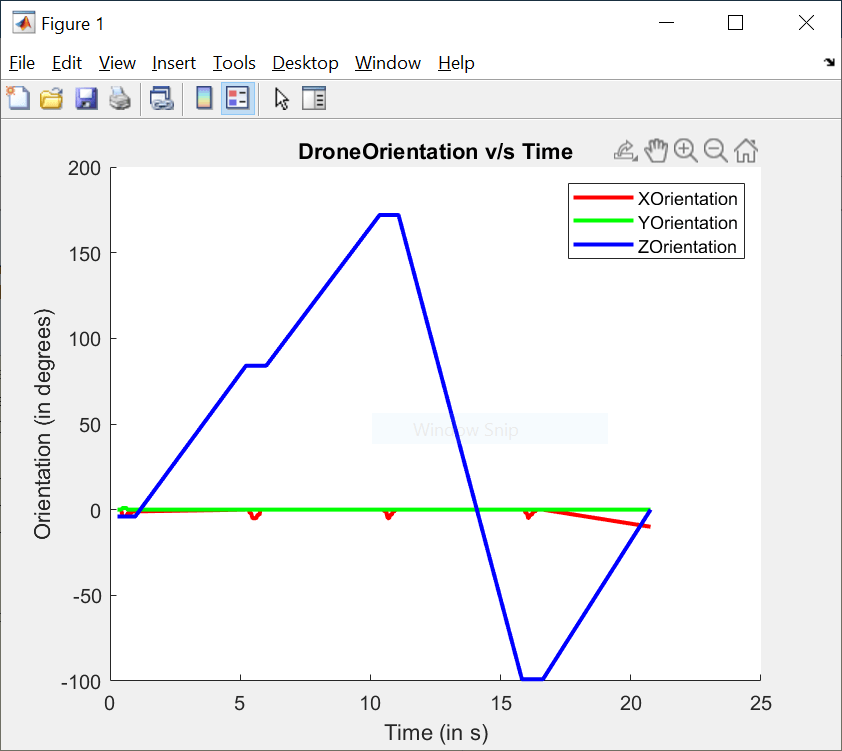
정사각형 경로를 따라 드론이 계속 비행하도록 하면서 이 비행 중의 방향 데이터를 플로팅합니다.
  edgeIndex = 1;
  distance = 0.5;
  speed = 0.5;
  tObj = tic;
  while(edgeIndex <= 4)
      % Move the drone unblocking the command line
      tplot = tic;
      moveforward(r, 'Distance', distance, 'Speed', speed, 'WaitUntilDone', false);
      % Plot orientation while drone is moving
      while(toc(tplot)<distance/speed)
         orientation = rad2deg(readOrientation(r));
         tStamp = toc(tObj);
         addpoints(hx, tStamp, orientation(2));
         addpoints(hy, tStamp, orientation(3));
         addpoints(hz, tStamp, orientation(1));
         drawnow;
      end
     % Turn the drone after it has traversed one side of the square path
     pause(2);
     turn(r, deg2rad(90));
edgeIndex = edgeIndex+1; end
작업 5 - 드론 착륙
최종 방향을 플로팅하고 드론을 착륙시킵니다.
   orientation = rad2deg(readOrientation(r));
   tStamp = toc(tObj);
   addpoints(hx, tStamp, orientation(2));
   addpoints(hy, tStamp, orientation(3));
   addpoints(hz, tStamp, orientation(1));
   drawnow;
   land(r);
작업 6 - 마무리
작업이 끝났으면 Ryze 드론에 대한 연결을 끊습니다.
clear r;

