Address Undecided due to Runtime Error in Simulink Design Verifier Analysis
R2026bThis example shows you how to find the error that is caused when Simulink® Design Verifier™ returns objectives with status as Undecided due to runtime error. Earlier, Simulink® Design Verifier™ did not explain the cause of the error details.
Open the Model
Open a model which returns the objective status as Undecided due to runtime error.
open_system('mUndecidedDueToRunTimeError');

Generate Test Cases for Generated Code from Model Toolstrip
1. On the Design Verifier tab, in the Mode section, select the Test Generation option.
2. Click on the Generate Test option to generate the tests.
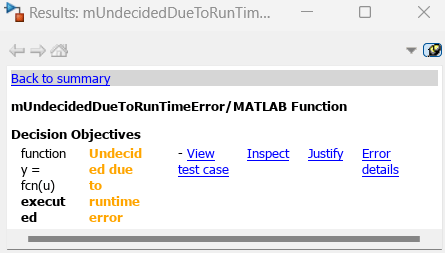
3. After generating the test, select a block that has objectives associated with it. The Informer window displays the list of decision objectives along with other options.
Check the Error Message
4. Access the runtime error by clicking the option Error details in the informer window. This option is valid only on the objectives with status Undecided due to runtime error.
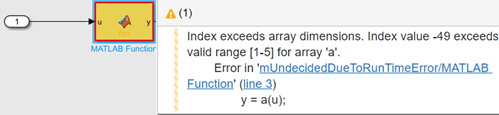
5. Simulink Design Verifier highlights the block with the runtime error and displays an error message next to the block.
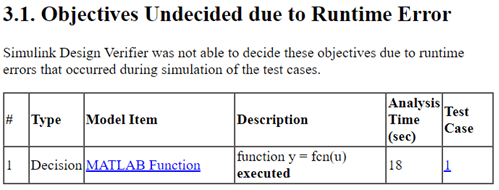
6. Generate the report to see the error message under the testcase which hits the runtime error.
Troubleshoot Undecided due to Runtime Error
The inport to the MATLAB Function block has datatype set to uint32 and the maximum and minimum range is not defined. Define the Signal Attributes values in the Block Parameter settings window. 1. Assign 1 as Minimum value and 5 as Maximum value.
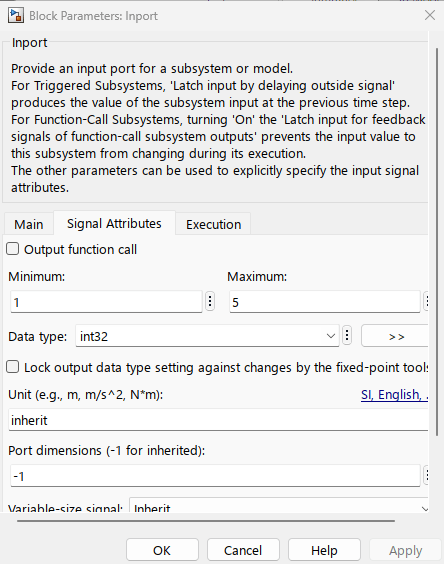
2. Save and Close.
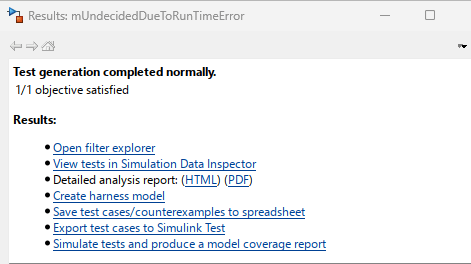
3. Click Generate Tests to run the analysis. The analysis completed normally with all the objectives satisfied.
See Also
Analyze and Resolve Undecided Objective Statuses

