주요 콘텐츠

DateTime to Formatted String

R2026b

Convert DateTime signal data type to formatted string

Since R2026b

  • DateTime to Formatted String block icon

Libraries:
Simulink / DateTime

Description

The DateTime to Formatted String block converts a DateTime signal data type to a formatted string.

Examples

expand all

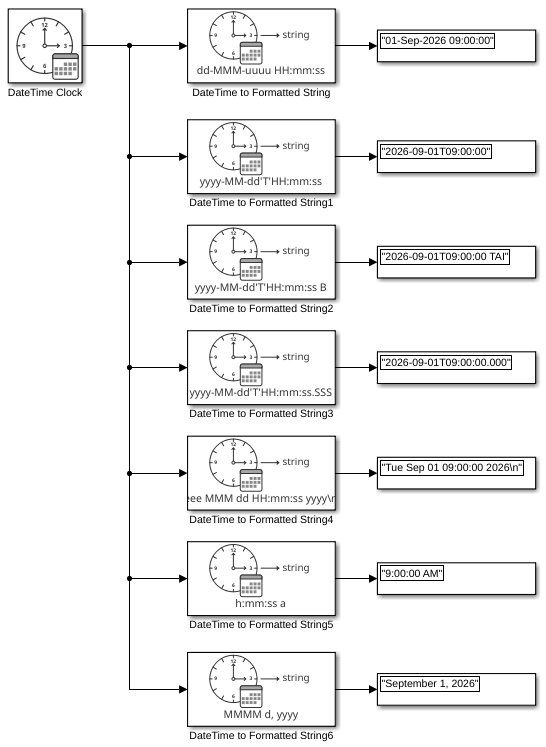
This example shows the result of each default format for the DateTime to Formatted String block being applied to a DateTime signal. The input for all DateTime to Formatted String blocks in the model is a DateTime signal that represents 9:00 AM TAI on September 1, 2026. The output is a string signal.

model='ex_datetime_to_formatted_string_block';
load_system(model)
sim(model);
open_system(model)
Ports

Input

expand all

DateTime signal, specified as a scalar.

Dependencies

To enable this parameter, set the Input mode parameter to DateTime.

Calendar year, specified as a real numeric scalar whose value is an integer.

Dependencies

To enable this port, set the Input mode parameter to Calendar time.

Data Types: single | double | int8 | uint8 | int16 | uint16 | int32 | uint32

Calendar month, specified as a real numeric scalar whose value is an integer between 1 and 12, inclusive.

Dependencies

To enable this port, set the Input mode parameter to Calendar time.

Data Types: single | double | int8 | uint8 | int16 | uint16 | int32 | uint32

Calendar day of month, specified as a real numeric scalar whose value is an integer between 1 and 31, inclusive.

Dependencies

To enable this port, set the Input mode parameter to Calendar time.

Data Types: single | double | int8 | uint8 | int16 | uint16 | int32 | uint32

Hour, specified as a real numeric scalar whose value is an integer between 0 and 23, inclusive.

Dependencies

To enable this port, set the Input mode parameter to Calendar time.

Data Types: single | double | int8 | uint8 | int16 | uint16 | int32 | uint32

Minute, specified as a real numeric scalar whose value is an integer between 0 and 59, inclusive.

Dependencies

To enable this port, set the Input mode parameter to Calendar time.

Data Types: single | double | int8 | uint8 | int16 | uint16 | int32 | uint32

Seconds, specified as a real numeric scalar 0 to less than 61.0.

Dependencies

To enable this port, set the Input mode parameter to Calendar time.

Data Types: single | double | int8 | uint8 | int16 | uint16 | int32 | uint32

Output

expand all

Converted DateTime signal, returned as a scalar string.

Data Types: string

Parameters

expand all

Specify the output string format:

  • dd-MMM-uuuu HH:mm:ss

  • yyyy-MM-dd'T'HH:mm:ss

  • yyyy-MM-dd'T'HH:mm:ss t

  • yyyy-MM-dd'T'HH:mm:ss.SSS

  • eee MMM dd HH:mm:ss yyyy\n

  • h:mm:ss a

  • MMMM d, yyyy

  • <enter custom format>

For more information on date formats, see Format. For <enter custom format>, use the supported identifiers to create a custom output string. Of the date and time format identifiers, Simulink® DateTime supports:

  • B

  • G

  • y

  • u

  • M

  • d

  • D

  • e

  • a

  • h

  • H

  • m

  • s

  • S

Programmatic Use

To set the block parameter value programmatically, use the set_param function.

To get the block parameter value programmatically, use the get_param function.

Parameter: Format
Values: dd-MMM-uuuu HH:mm:ss (default) | yyyy-MM-dd'T'HH:mm:ss | yyyy-MM-dd'T'HH:mm:ss t | yyyy-MM-dd'T'HH:mm:ss.SSS | eee MMM dd HH:mm:ss yyyy\n | h:mm:ss a | MMMM d, yyyy | <enter custom format>

Specify the input mode:

  • DateTime — DateTime data type input from DateTime Clock block.

  • Calendar time — Calendar format of year, month, day, hour, minute, and second.

Programmatic Use

To set the block parameter value programmatically, use the set_param function.

To get the block parameter value programmatically, use the get_param function.

Parameter: InputMode
Values: DateTime (default) | Calendar Time

Block Characteristics

Data Types

Boolean | bus | datetime | double | integer | single | string

Direct Feedthrough

yes

Multidimensional Signals

no

Variable-Size Signals

no

Zero-Crossing Detection

no

Extended Capabilities

expand all

C/C++ Code Generation
Generate C and C++ code using Simulink® Coder™.

Version History

Introduced in R2026b