Configure Model from Command Line
R2026bThe code generator provides model configuration parameters for customizing generated code. Depending on how you use and interact with the generated code, you make configuration decisions. You choose a configuration that best matches your needs for debugging, traceability, code efficiency, and safety precaution.
It is common to automate the model configuration process by using a MATLAB® script once you have decided upon a desired configuration.
The example describes:
Concepts of working with configuration parameters
Documentation to understand the code generation options
Tools and scripts to automate the configuration of a model
Configuration Parameter Workflows
There are many workflows for Configuration Parameters that include persistence within a single model or persistence across multiple models. Depending on your needs, you can work with configuration sets as copies or references. This example shows the basics steps for working directly with the active configuration set of a model. For a comprehensive description of configuration set features and workflows, see Manage Configuration Sets for a Model in the Simulink® documentation.
Configuration Set Basics
Load a model into memory.
model='ThrottleControl';
load_system(model)
Obtain the model's active configuration set.
cs = getActiveConfigSet(model);
Simulink® Coder™ exposes a subset of the code generation options. If you are using Simulink® Coder™, select the Generic Real-Time (GRT) target.
switchTarget(cs,'grt.tlc',[]);
Embedded Coder® exposes the complete set of code generation options. If you are using Embedded Coder®, select the Embedded Real-Time (ERT) target.
switchTarget(cs,'ert.tlc',[]);
To automate configuration of models built for GRT- and ERT-based targets, the configuration set IsERTTarget attribute is useful.
isERT = strcmp(get_param(cs,'IsERTTarget'),'on');
You can interact with code generation options via the model or the configuration set. This example gets and sets options indirectly via the model.
deftParamBehvr = get_param(model,'DefaultParameterBehavior');  % Get
set_param(model,'DefaultParameterBehavior',deftParamBehvr)     % Set
This example gets and sets options directly via the configuration set.
if isERT
    lifespan = get_param(cs,'LifeSpan');  % Get LifeSpan
    set_param(cs,'LifeSpan',lifespan)     % Set LifeSpan
end
Configuration Option Summary
The full list of code generation options are documented with tradeoffs for debugging, traceability, code efficiency, and safety precaution. For Simulink® Coder™, see the Simulink® Coder™ version of Recommended Settings Summary for Model Configuration Parameters. For Embedded Coder®, see the Embedded Coder® version of Recommended Settings Summary for Model Configuration Parameters (Embedded Coder).
Use Code Generation Advisor to obtain a model configuration optimized for your goals. In the Set Objectives dialog box, you can set and prioritize objectives.
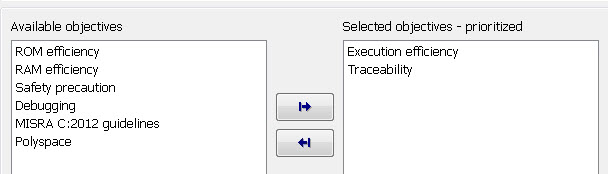
You can find documentation about the Code Generation Advisor in Application Objectives Using Code Generation Advisor. You can find additional documentation specific to Embedded Coder® in Configure Model for Code Generation Objectives by Using Code Generation Advisor (Embedded Coder).
Parameter Configuration Scripts
Simulink® Coder™ provides an example configuration script that you can use as a starting point for your application. A list of the most relevant GRT and ERT code generation options is contained in rtwconfiguremodel.m.
Alternatively, you can generate a MATLAB function that contains the complete list of model configuration parameters by using the configuration set saveAs function.
% Save the model's configuration parameters to file 'MyConfig.m'.
saveAs(cs,'MyConfig')

% Display the first 50 lines of MyConfig.m.
dbtype MyConfig 1:50
1     function cs = MyConfig()
2     % MATLAB function for configuration set generated on 07-Aug-2026 04:08:04
3     % MATLAB version: 26.2.0.3341813 (R2026b)
4
5     cs = Simulink.ConfigSet;
6
7     % Original configuration set version: 26.1.1
8     if cs.versionCompare('26.1.1') < 0
9         error('Simulink:MFileVersionViolation', 'The version of the target configuration set is older than the original configuration set.');
10    end
11
12    % Character encoding: UTF-8
13
14    % Do not change the order of the following commands. There are dependencies between the parameters.
15    cs.set_param('Name', 'Configuration'); % Name
16    cs.set_param('Description', ''); % Description
17
18    % Original configuration set target is ert.tlc
19    cs.switchTarget('ert.tlc','');
20
21    cs.set_param('HardwareBoard', 'None');   % Hardware board
22
23    cs.set_param('TargetLang', 'C');   % Language
24
25    cs.set_param('CodeInterfacePackaging', 'Nonreusable function');   % Code interface packaging
26
27    cs.set_param('GenerateAllocFcn', 'off');   % Use dynamic memory allocation for model initialization
28
29    cs.set_param('Solver', 'FixedStepDiscrete');   % Solver
30
31    % Solver
32    cs.set_param('StartTime', '0.0');   % Start time
33    cs.set_param('StopTime', '10.0');   % Stop time
34    cs.set_param('DateTimeAtSimulationTimeZero', '');   % Date and time at simulation time zero
35    cs.set_param('SolverName', 'FixedStepDiscrete');   % Solver
36    cs.set_param('SolverType', 'Fixed-step');   % Type
37    cs.set_param('SampleTimeConstraint', 'Unconstrained');   % Periodic sample time constraint
38    cs.set_param('FixedStep', '.001');   % Fixed-step size (fundamental sample time)
39    cs.set_param('EnableFixedStepZeroCrossing', 'off');   % Enable zero-crossing detection for fixed-step simulation
40    cs.set_param('ConcurrentTasks', 'off');   % Allow tasks to execute concurrently on target
41    cs.set_param('EnableMultiTasking', 'on');   % Treat each discrete rate as a separate task
42    cs.set_param('AllowMultiTaskInputOutput', 'off');   % Allow multiple tasks to access inputs and outputs
43    cs.set_param('PositivePriorityOrder', 'off');   % Higher priority value indicates higher task priority
44    cs.set_param('AutoInsertRateTranBlk', 'off');   % Automatically handle rate transition for data transfer
45
46    % Data Import/Export
47    cs.set_param('Decimation', '1');   % Decimation
48    cs.set_param('LoadExternalInput', 'off');   % Load external input
49    cs.set_param('SaveFinalState', 'off');   % Save final state
50    cs.set_param('LoadInitialState', 'off');   % Load initial state
Each parameter setting in the generated file includes a comment for the corresponding parameter string in the Configuration Parameters dialog box.
Summary
Simulink provides a rich set of MATLAB functions to automate the configuring a model for simulation and code generation. Simulink Coder and Embedded Coder® provide additional functionality specific for code generation. The Code Generation Advisor optimizes the model configuration based on a set of prioritized goals. You can save the optimal configuration to a MATLAB file by using the configuration set saveAs function, and reuse it across models and projects.

