이 페이지는 기계 번역을 사용하여 번역되었습니다. 최신 내용을 영문으로 보려면 여기를 클릭하십시오.
소스 코드 생성
R2026a소스 코드 모듈 생성 및 검증
소스 코드 생성을 시작하는 방법과 코드 생성기가 생성하는 파일과 폴더에 대해 알아봅니다. 대규모 프로젝트를 구성하려면 코드 생성 프로젝트 템플릿을 사용하십시오. 프로젝트는 필요한 파일을 찾고, 파일과 설정을 관리하고 공유하고, 소스 컨트롤과 상호 작용하고, 제어기 코드를 생성하고, 테스트 하네스 시뮬레이션을 실행하는 데 도움이 됩니다.
Generate Code by Using the Quick Start Tool에서 시작할 수 있습니다.
앱
| Simulink Coder | Simulink 모델, Stateflow 차트 및 MATLAB 함수로부터 C 및 C++ 코드를 생성하고 실행하여 시뮬레이션 가속화, 신속 프로토타이핑 및 HIL(Hardware-in-the-Loop) 시뮬레이션과 같은 애플리케이션에 활용합니다. |
함수
도움말 항목
코드 생성
- Generate Code by Using the Quick Start Tool
Prepare a model for quickly generating code for rapid prototyping. - Reduce the Time It Takes to Generate Code
Alter a model to increase the speed at which the code generator generates code. - Simulink Coder를 사용하여 코드 생성
Simulink® 모델용 시스템 타깃 파일을 선택하고, 실시간 시뮬레이션을 위한 C 코드를 생성하며, 생성된 파일을 확인합니다. - Internationalization and Code Generation
Internationalization support for enabling efficient globalization. - What Is Code Replacement?
Why and how to replace code. Code replacement libraries that MathWorks provides. Contents of a code replacement library and how the code generator uses the contents. Terminology and limitations. - Replace Code Generated from Simulink Models
This example shows how to replace generated code by using a code replacement library. - Control Regeneration of Top Model Code
Choose options for regenerating code for the top-level model. - Set Up Model for Controlling Program Execution
Set up a model so that you can start and stop program execution for logging output, monitoring data, and tuning parameters. - Configure Model for Debugging
Configure a model so that generated code and the build process are set for debugging. - Aircraft Position Radar Model
Generate code for model that contains an Extended Kalman Filter that estimates aircraft position from radar measurements.
프로젝트에서 코드 생성
- Generate Code and Simulate Models in a Project
This example shows how to use the code generation template for a new Project. - Generate Code and Simulate Models Programmatically with Project
This example shows how to use the Project API to create a new project and automate project tasks for manipulating files.
코드 생성 파일 및 폴더
- 빌드 프로세스 폴더 관리
코드 생성기가 생성하는 폴더를 관리합니다. - Manage Build Process Files
Work with generated source files and dependency files that the code generator produces. - Manage Build Process File Dependencies
Work with generated source files and dependency files that the code generator produces. - Build Process Support for File and Folder Names
Troubleshoot build process errors that occur when file system issues prevent file processing.
추천 예제
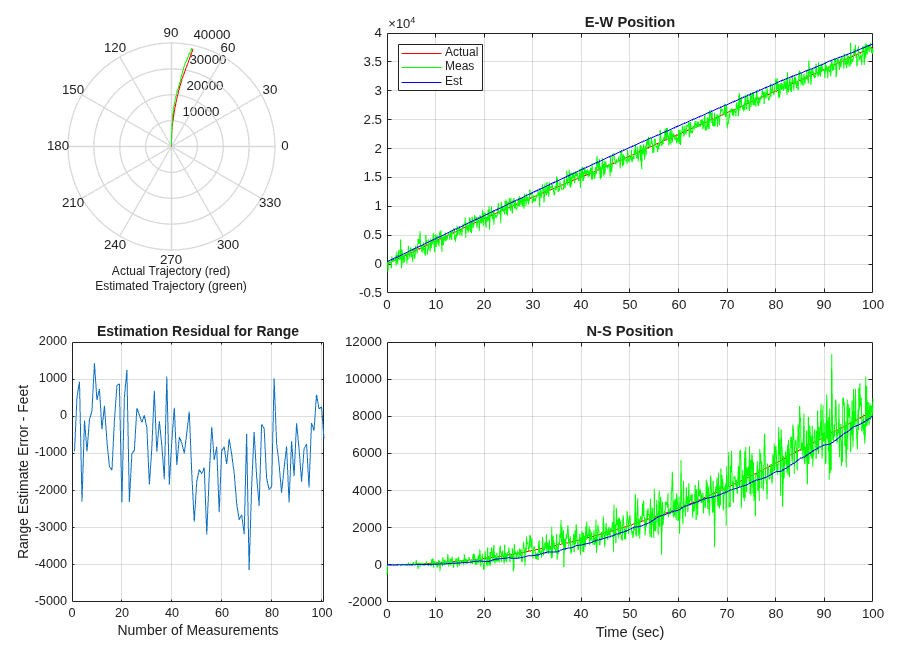
Aircraft Position Radar Model
Generate code for model that contains an Extended Kalman Filter that estimates aircraft position from radar measurements.

