Generate Structured Text Code for a MATLAB Function Block
R2026bThis example shows how to model, simulate, and generate code for a Simulink® subsystem that has a MATLAB® Function Block. Generate code for the MATLAB Function Block by using Simulink PLC Coder™.
Model Description
The model consists of these components:
TankControl —MATLAB Function block that takes the tank height and valve command as inputs and generates the tank input flow rate, output flow rate, and stirrer speed.Tank Dynamics —Simulink subsystem that models the dynamics of the tank.Signal Editor — Signal Editor block that models the valve command to the
TankControlblock.
Open the model.
open_system('plcdemo_eml_tankcontrol');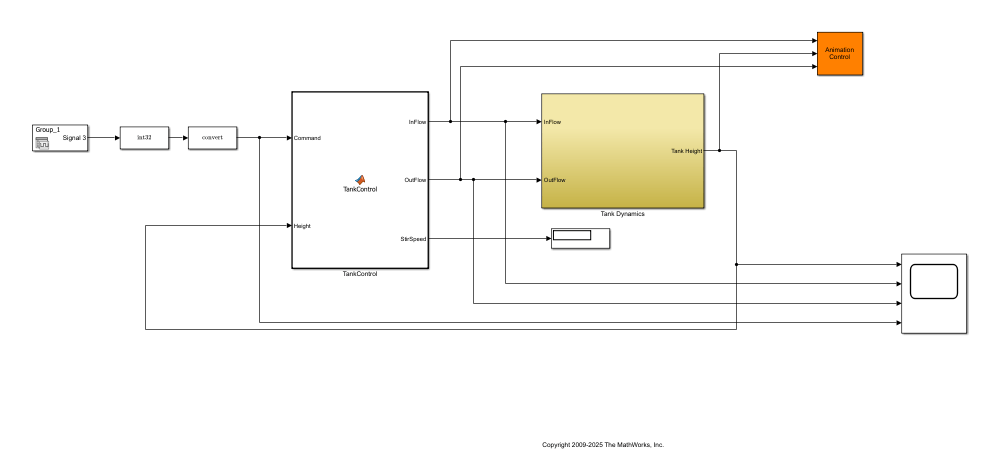
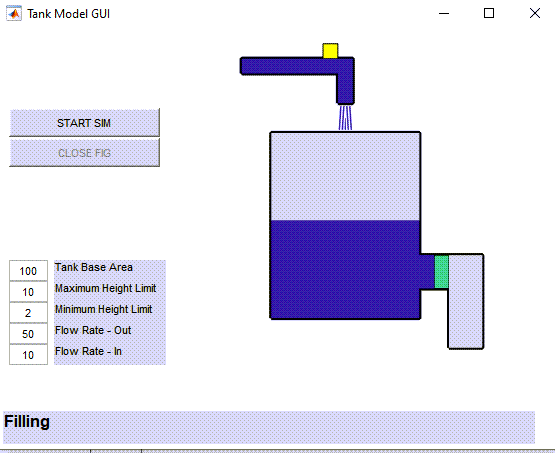
Simulate the model and verify the valve operation by changing the tank height, flow rates, and other parameters. After verifying that the TankControl block functions according to your requirements, generate code for the TankControl block.
Generate Code
To generate structured text code, do one of the following:
Open the PLC Coder app. Select the
SimpleSubsystemblock and clickGenerate PLC Code.Use the
plcgeneratecodefunction:
plcgeneratecode('plcdemo_eml_tankcontrol/TankControl');

