Generate Structured Text for Enumeration-to-Integer Data Conversion
R2026bThis example shows how to generate IEC 61131-3 Structured Text code that converts an enumerated value into an integer value. The model represents a motor command system with a variable frequency drive (VFD). VFD control registers accept integer values over communication networks such as Modbus and Ethernet/IP, while Structured Text logic uses enumerated values.
Open the Model
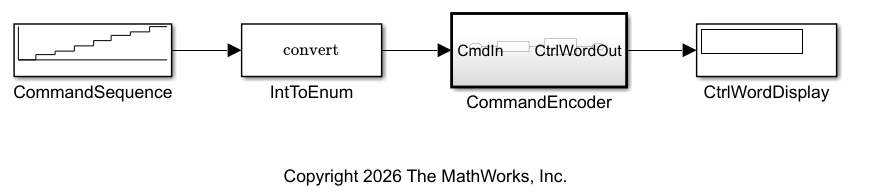
In this example, the plc_enum_drive_cmd model accepts enumerated commands as inputs, converts them to integers, and sends the integer value to the VFDs.
Open the model.
modelName = "plc_enum_drive_cmd";
open_system(modelName)
The top-level atomic subsystem, CommandEncoder accepts an enumerated input, CommandSequence, and outputs the corresponding integer value. The CommandEncoder subsystem extracts the enumerated type command by using a Data Type Conversion block.
This table lists the enumerated command name, the corresponding integer value, and the converted integer value. The MotorCommand script file contains the enumerated data type definitions. Because the MotorCommand script contains the enumerated data type definitions, it must be in the same folder as the plc_enum_drive_cmd model.
Enumeration Name | Integer Value | Drive Action |
|---|---|---|
| 0 | Coast to stop |
| 1 | Run motor in forward direction at setpoint speed |
| 2 | Run motor in reverse direction at setpoint speed |
| 3 | Jog forward at low preset speed |
| 4 | Jog reverse at low preset speed |
| 5 | Decelerate to a fast stop |
| 6 | Clear latched fault and return VFD to a ready state |
| 7 | Freeze current speed |
Configure Model and Generate Code
You can generate Structured Text code for the plc_enum_drive_cmd model by using the PLC Coder app or by using the plcopenconfigset and plcgeneratecodeM functions.
Generate Code Using the PLC Coder App
To configure the model, open the PLC Coder app and in the PLC Code tab, click Settings. In the Configuration Parameters dialog box, click PLC Code Generation Settings > Identifiers and:
Select the Override Target Default enum Name Behavior parameter. When you select this parameter, the generated code uses the enumerated commands such as
Stop,RunForward,Hold, andFaultResetinstead of the corresponding integers.Select the Generate enum Cast Function parameter and then select the Inline Enum Cast Function parameter. The Inline Enum Cast Function model configuration parameter inlines the model function that converts enumerated data to integer data.
To generate code:
In the Configuration Parameters dialog box, in the left pane, click PLC Code Generation.
Set Target IDE to
CODESYS 3.5.Click OK.
In the model, select the
CommandEncodersubsystem.In the PLC Code tab, click Generate PLC Code.
Configure Model and Generate Code Programmatically
Configure the model to preserve the enumerated data names in the generated code and inline the generated enumeration-to-integer data to conversion function. Set the target IDE to CODESYS 3.5.
plcopenconfigset(modelName);
set_param(modelName, PLC_TargetIDE="codesys35");
set_param(modelName, PLC_GenerateEnumSymbolicName="on");
set_param(modelName, PLC_GenerateEnumCastFunction="on");
set_param(modelName, PLC_InlineEnumCastFunction="on");
Generate code by using the plcgeneratecode function.
generatedFiles = plcgeneratecode("plc_enum_drive_cmd/CommandEncoder")### Generating PLC code for 'plc_enum_drive_cmd/CommandEncoder'. ### Using model settings from 'plc_enum_drive_cmd' for PLC code generation parameters. ### Gathering test vectors for PLC testbench. ### Begin code generation for IDE CODESYS 3.5 (codesys35). ### Emit PLC code to file. ### Creating PLC code generation report index.html. ### PLC code generation successful for 'plc_enum_drive_cmd/CommandEncoder'. ### Generated files: plcsrc/plc_enum_drive_cmd.xml
generatedFiles = 1×1 cell array
{'plcsrc/plc_enum_drive_cmd.xml'}
Examine the Generated Structured Text Code
The generated Structured Text code contains the MotorCommand enumeration type definition and a function block for the CommandEncoder subsystem.
coder.example.extractLines(fullfile("plcsrc","plc_enum_drive_cmd.st"), ... "TYPE MotorCommand", "END_TYPE", true, true)
TYPE MotorCommand:
(Stop, RunForward, RunReverse, JogForward, JogReverse, EmergencyStop, FaultReset, Hold);
END_TYPE
View the generated function block.
coder.example.extractLines(fullfile("plcsrc","plc_enum_drive_cmd.st"), ... "FUNCTION_BLOCK CommandEncoder", "END_FUNCTION_BLOCK", true, true)
FUNCTION_BLOCK CommandEncoder
VAR_INPUT
CmdIn: MotorCommand;
END_VAR
VAR_OUTPUT
CtrlWordOut: DINT;
END_VAR
VAR_TEMP
in: MotorCommand;
END_VAR
(* Outputs for Atomic SubSystem: '<Root>/CommandEncoder' *)
(* Outport: '<Root>/CtrlWordOut' incorporates:
* DataTypeConversion: '<S1>/EnumToInt' *)
in := CmdIn;
CASE in OF
Stop:
CtrlWordOut := 0;
RunForward:
CtrlWordOut := 1;
RunReverse:
CtrlWordOut := 2;
JogForward:
CtrlWordOut := 3;
JogReverse:
CtrlWordOut := 4;
EmergencyStop:
CtrlWordOut := 5;
FaultReset:
CtrlWordOut := 6;
Hold:
CtrlWordOut := 7;
END_CASE;
(* End of Outputs for SubSystem: '<Root>/CommandEncoder' *)
END_FUNCTION_BLOCK
The CASE statement in the generated function block uses symbolic names instead of integer values to switch to the relevant function. In the function block, the CASE statement sets the command variable CtrlWordOut to an integer value that corresponds to the enumerated command. Additionally, the enumeration-to-integer type conversion command is inlined.
If you do not inline the cast function, the generated Structured Text code has more lines and is less readable. To see the difference, disable the PLC_InlineEnumCastFunction model configuration parameter and generate code.
set_param(modelName,PLC_InlineEnumCastFunction = "off"); generatedFiles = plcgeneratecode("plc_enum_drive_cmd/CommandEncoder")
### Generating PLC code for 'plc_enum_drive_cmd/CommandEncoder'.
### Using model settings from 'plc_enum_drive_cmd' for PLC code generation parameters.
### Gathering test vectors for PLC testbench.
### Begin code generation for IDE CODESYS 3.5 (codesys35).
### Emit PLC code to file.
### Creating PLC code generation report index.html.
### PLC code generation successful for 'plc_enum_drive_cmd/CommandEncoder'.
### Generated files:
plcsrc/plc_enum_drive_cmd.xml
generatedFiles = 1×1 cell array
    {'plcsrc/plc_enum_drive_cmd.xml'}
View the generated function block.
coder.example.extractLines(fullfile("plcsrc","plc_enum_drive_cmd.st"), ... "FUNCTION c_Enum_Convert_MotorCommand", "END_FUNCTION", true, true)
FUNCTION c_Enum_Convert_MotorCommand: DINT
VAR_INPUT
in: MotorCommand;
END_VAR
CASE in OF
Stop:
c_Enum_Convert_MotorCommand := 0;
RunForward:
c_Enum_Convert_MotorCommand := 1;
RunReverse:
c_Enum_Convert_MotorCommand := 2;
JogForward:
c_Enum_Convert_MotorCommand := 3;
JogReverse:
c_Enum_Convert_MotorCommand := 4;
EmergencyStop:
c_Enum_Convert_MotorCommand := 5;
FaultReset:
c_Enum_Convert_MotorCommand := 6;
Hold:
c_Enum_Convert_MotorCommand := 7;
END_CASE;
END_FUNCTION
The generated Structured Text code has an additional type conversion function that is not inlined. The CASE statement now calls the type conversion function.
coder.example.extractLines(fullfile("plcsrc","plc_enum_drive_cmd.st"), ...
    "FUNCTION_BLOCK CommandEncoder", "END_FUNCTION_BLOCK", true, true)
FUNCTION_BLOCK CommandEncoder
VAR_INPUT
    CmdIn: MotorCommand;
END_VAR
VAR_OUTPUT
    CtrlWordOut: DINT;
END_VAR
(* Outputs for Atomic SubSystem: '<Root>/CommandEncoder' *)
(* Outport: '<Root>/CtrlWordOut' incorporates:
 *  DataTypeConversion: '<S1>/EnumToInt' *)
CtrlWordOut := c_Enum_Convert_MotorCommand(in := CmdIn);
(* End of Outputs for SubSystem: '<Root>/CommandEncoder' *)
END_FUNCTION_BLOCK
See Also
Model Settings
- Generate enum Cast Function | Override Target Default enum Name Behavior | Inline Enum Cast Function

