2차원 점의 들로네 삼각분할
R2026bdelaunayTriangulation을 사용하여 seamount 데이터로 들로네 삼각분할을 만들고, 삼각분할을 쿼리하고 편집합니다. seamount 데이터 세트에는 seamount의 곡면을 정의하는 (x, y) 위치값과 대응하는 고도값(z)이 포함되어 있습니다.
(x, y) 데이터를 불러온 후 삼각분할합니다.
load seamount
DT = delaunayTriangulation(x,y)
DT =
delaunayTriangulation with properties:
Points: [294×2 double]
ConnectivityList: [566×3 double]
Constraints: []
적용된 모서리 제약 조건이 없으므로 Constraints 속성은 비어 있습니다. Points 속성은 꼭짓점의 좌표를 나타내고, ConnectivityList 속성은 삼각형을 나타냅니다. 이 두 속성이 함께 삼각분할의 행렬 데이터를 정의합니다.
delaunayTriangulation 클래스는 행렬 데이터를 감싸는 래퍼이며, 일련의 상호 보완적인 메서드를 제공합니다. 구조체의 필드에 액세스하는 것과 같은 방법으로 delaunayTriangulation의 속성에 액세스합니다.
꼭짓점 데이터에 액세스합니다.
DT.Points;
연결 데이터에 액세스합니다.
DT.ConnectivityList;
ConnectivityList 속성의 첫 번째 삼각형에 액세스합니다.
DT.ConnectivityList(1,:)
ans = 1×3

   230   205   152
delaunayTriangulation은 ConnectivityList 속성 행렬의 요소를 참조할 수 있는 쉬운 방법을 제공합니다.
첫 번째 삼각형에 액세스합니다.
DT(1,:)
ans = 1×3

   230   205   152
첫 번째 삼각형의 첫 번째 꼭짓점을 검토합니다.
DT(1,1)
ans =
230
삼각분할의 모든 삼각형을 검토합니다.
DT(:,:);
delaunayTriangulation 출력 인수 DT의 요소를 참조하는 것은 delaunay의 삼각분할 배열 출력값의 요소를 참조하는 것과 같은 방식으로 동작합니다. 이 두 인덱싱의 차이점은 DT에서 호출할 수 있는 추가 메서드(예: nearestNeighbor와 pointLocation)에 있습니다.
triplot을 사용하여 delaunayTriangulation을 플로팅합니다. triplot 함수는 delaunayTriangulation 메서드가 아니지만, delaunayTriangulation을 받고 이를 플로팅할 수 있습니다.
triplot(DT)
axis equal
xlabel("Longitude")
ylabel("Latitude")
grid on
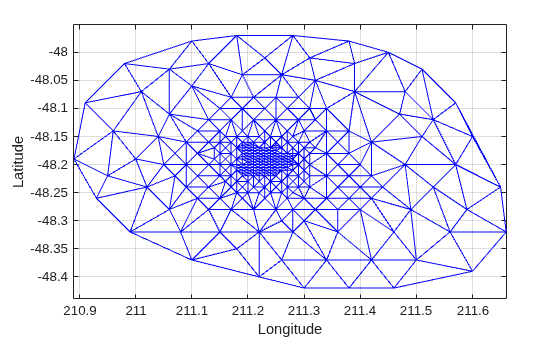
또는 triplot(DT(:,:), DT.Points(:,1), DT.Points(:,2));를 사용하여 동일한 플롯을 얻을 수도 있습니다.
delaunayTriangulation 메서드인 convexHull을 사용하여 컨벡스 헐을 계산하고 이를 플롯에 추가합니다. 이미 들로네 삼각분할이 있으므로, 이 메서드를 사용하면 convhull을 사용하여 전체를 계산하는 것보다 더 효율적으로 컨벡스 헐을 도출할 수 있습니다.
hold on
k = convexHull(DT);
xHull = DT.Points(k,1);
yHull = DT.Points(k,2);
plot(xHull,yHull,"r",LineWidth=2)
hold off
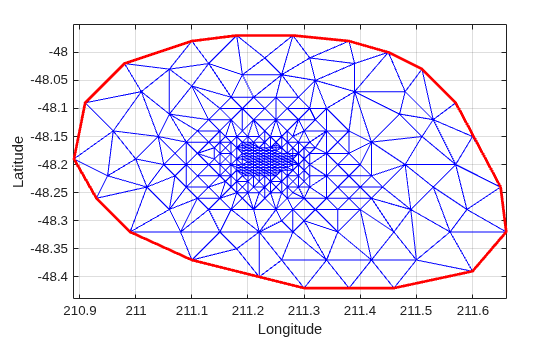
delaunayTriangulation을 점진적으로 편집하여 점을 추가하거나 제거할 수 있습니다. 기존 삼각분할에 점을 추가해야 하는 경우, 늘어난 점 집합을 완전히 다시 삼각분할하는 것보다 점을 점진적으로 추가하는 것이 더 빠릅니다. 제거할 점의 개수가 기존의 점 개수에 비해 상대적으로 적을 경우에는 점을 점진적으로 제거하는 것이 더 효율적입니다.
삼각분할을 편집하여 이전 계산에서 컨벡스 헐 상의 점들을 제거합니다.
figure
plot(xHull,yHull,"r",LineWidth=2)
axis equal
xlabel("Longitude")
ylabel("Latitude")
grid on
컨벡스 헐 토폴로지는 시작 꼭짓점과 끝 꼭짓점을 복제합니다. 중복된 항목을 제거합니다.
k(end) = [];
이제 컨벡스 헐의 점들을 제거합니다.
DT.Points(k,:) = []
DT =
  delaunayTriangulation with properties:

              Points: [274×2 double]
    ConnectivityList: [528×3 double]
         Constraints: []
새로운 삼각분할을 플로팅합니다.
hold on
triplot(DT)
hold off
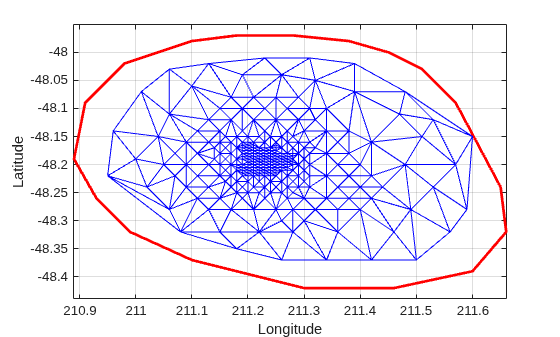
컨벡스 헐의 경계 바로 안쪽에 제거되지 않은 꼭짓점 한 개가 있습니다. Figure에서 확대 툴을 사용하여 이 꼭짓점이 볼록 껍질의 안쪽에 있음을 확인할 수 있습니다. 꼭짓점 레이블을 플로팅하여 이 꼭짓점의 인덱스를 확인한 후 삼각분할에서 제거할 수 있습니다. 또는 nearestNeighbor 메서드를 사용하여 인덱스를 더 쉽게 식별할 수도 있습니다.
이 점은 위치 (211.6, -48.15)에 근접해 있습니다. nearestNeighbor 메서드를 사용하여 가장 가까이 있는 꼭짓점을 찾습니다.
vertexId = nearestNeighbor(DT,211.6,-48.15)
vertexId =
50
이제 삼각분할에서 이 꼭짓점을 제거합니다.
DT.Points(vertexId,:) = []
DT =
  delaunayTriangulation with properties:

              Points: [273×2 double]
    ConnectivityList: [525×3 double]
         Constraints: []
새로운 삼각분할을 플로팅합니다.
figure
plot(xHull,yHull,"r",LineWidth=2)
axis equal
xlabel("Longitude")
ylabel("Latitude")
grid on
hold on
triplot(DT)
hold off
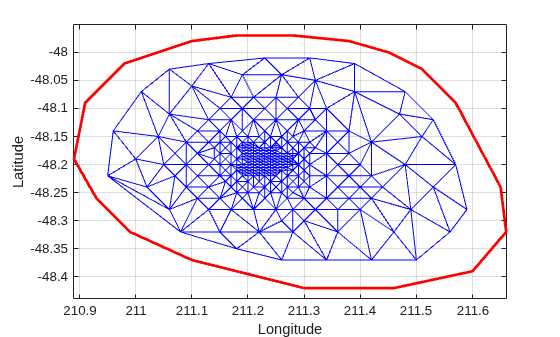
기존 삼각분할에 점을 추가합니다. 삼각분할 둘레에 사각형을 형성하도록 4개의 점을 추가합니다.
Padditional = [210.9 -48.5; 211.6 -48.5; ...
     211.6 -47.9; 210.9 -47.9];
DT.Points(end+(1:4),:) = Padditional
DT =
delaunayTriangulation with properties:
Points: [277×2 double]
ConnectivityList: [548×3 double]
Constraints: []
기존 Figure를 모두 닫습니다.
close all새로운 삼각분할을 플로팅합니다.
figure
plot(xHull,yHull,"r",LineWidth=2)
axis equal
xlabel("Longitude")
ylabel("Latitude")
grid on
hold on
triplot(DT)
hold off
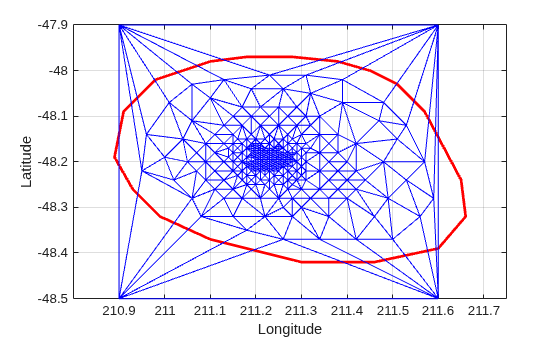
삼각분할의 점을 편집하여 새 위치로 이동할 수 있습니다. 추가된 점 집합의 첫 번째 점(꼭짓점 ID 274)을 편집합니다.
DT.Points(274,:) = [211 -48.4];
기존 Figure를 모두 닫습니다.
close all새로운 삼각분할을 플로팅합니다.
figure
plot(xHull,yHull,"r",LineWidth=2)
axis equal
xlabel("Longitude")
ylabel("Latitude")
grid on
hold on
triplot(DT)
hold off
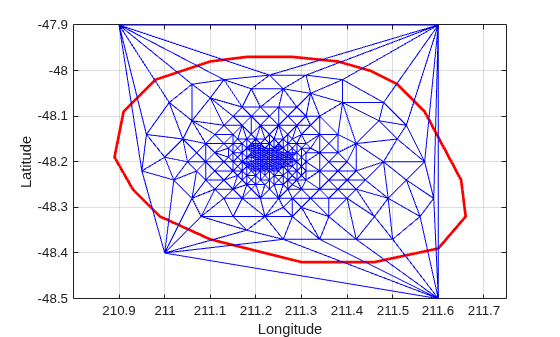
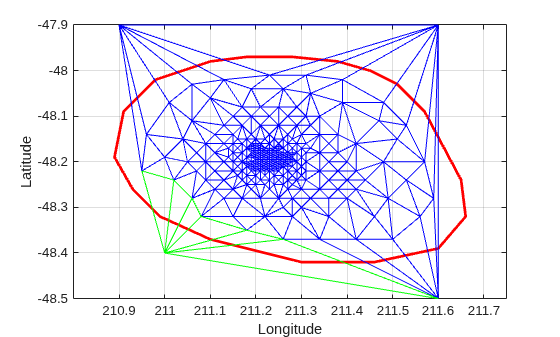
triangulation 클래스의 메서드인 vertexAttachments를 사용하여 꼭짓점에 연결된 삼각형을 찾습니다. 꼭짓점에 연결된 삼각형의 개수는 가변적이므로, 이 메서드는 연결된 삼각형 ID를 셀형 배열로 반환합니다. 내용을 추출하려면 중괄호가 필요합니다.
attTris = vertexAttachments(DT,274);
hold on
triplot(DT(attTris{:},:),DT.Points(:,1),DT.Points(:,2),"g")
hold off
delaunayTriangulation을 사용하여 3차원 공간의 점을 삼각분할할 수도 있습니다. 결과로 생성되는 삼각분할은 사면체로 구성됩니다.

