알파 셰이프
R2026balphaShape 함수를 사용하여 2차원 점 집합의 알파 셰이프를 구합니다.
알파 셰이프는 세부 표시 수준을 제어하거나 경계를 점 주위에 어느 정도로 맞출지 제어하는 파라미터를 갖습니다. 이 파라미터를 알파 또는 알파 반지름이라고 합니다. 알파 반지름을 0에서 Inf까지 다양하게 지정하면, 지정된 점 집합에 고유한 여러 알파 셰이프 세트가 생성됩니다.
2차원 점 집합을 만듭니다.
X = [-1.5 3.2; 1.8 3.3; -3.7 1.5; -1.5 1.3; 0.8 1.2; ...
      3.3 1.5; -4.0 -1.0; -2.3 -0.7; 0 -0.5; 2.0 -1.5; ...
      3.7 -0.8; -3.5 -2.9; -0.9 -3.9; 2.0 -3.5; 3.5 -2.25];
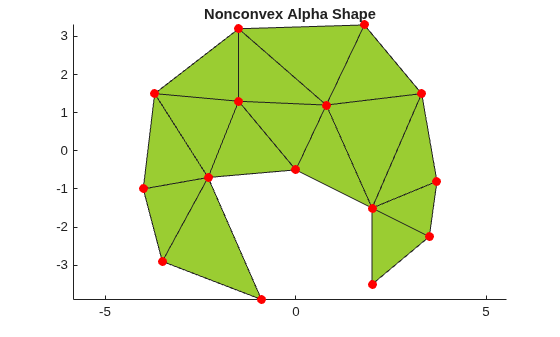
이 점 집합의 알파 셰이프를 계산하고 플로팅합니다.
shp = alphaShape(X)
shp =
  alphaShape with properties:

             Points: [15×2 double]
              Alpha: 1.7618
      HoleThreshold: 0
    RegionThreshold: 0
hold on
plot(shp)
plot(X(:,1),X(:,2),"r.",MarkerSize=20)
title("Nonconvex Alpha Shape")
hold off
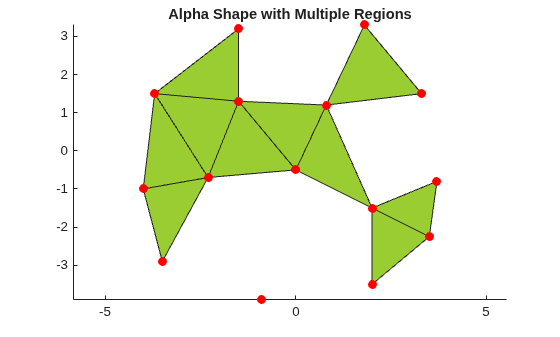
알파 반지름을 다양하게 지정할 경우 구멍을 포함하거나 포함하지 않는 여러 영역으로 구성된 알파 셰이프가 생성될 수도 있습니다. 그러나 MATLAB®의 alphaShape 함수는 항상 정형화된 알파 셰이프를 반환하며, 점, 모서리, 면이 고립(Isolated)되거나 미완(Dangling) 상태가 되지 않도록 합니다.
figure
shp = alphaShape(X,1.5)
shp =
  alphaShape with properties:

             Points: [15×2 double]
              Alpha: 1.5000
      HoleThreshold: 0
    RegionThreshold: 0
hold on
plot(shp)
plot(X(:,1),X(:,2),"r.",MarkerSize=20)
title("Alpha Shape with Multiple Regions")
hold off
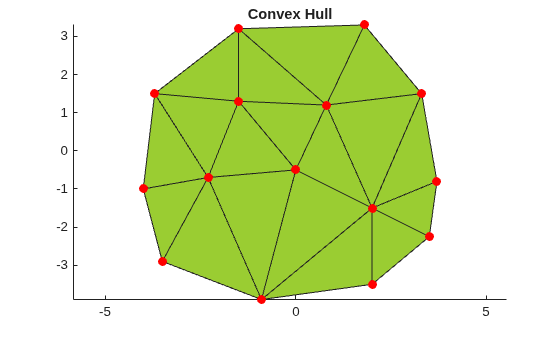
점 집합의 알파 셰이프는 컨벡스 헐(Convex Hull)의 일반화이며 들로네 삼각분할(Delaunay Triangulation)의 부분 그래프입니다. 즉, 컨벡스 헐은 알파 셰이프의 한 유형이며, 알파 셰이프 전체 집단은 지정된 점 집합에 대한 들로네 삼각분할에서 파생될 수 있습니다.
점 집합의 컨벡스 헐을 계산하고 플로팅합니다. 알파 반지름을 Inf로 설정할 경우 결과로 생성되는 알파 셰이프는 점 집합의 컨벡스 헐이 됩니다.
shp = alphaShape(X,Inf);
hold on
plot(shp)
plot(X(:,1),X(:,2),"r.",MarkerSize=20)
title("Convex Hull")
hold off