I2C 인터페이스
R2026bBeagleBone® Black I2C 인터페이스 사용
BeagleBone Black I2C 인터페이스를 사용하여 장치에 연결하고 이를 제어합니다.
객체
beaglebone | Connection to BeagleBone Black hardware |
i2cdev | Connection to device on BeagleBone Black I2C bus |
함수
clear | Terminate connection to BeagleBone Black hardware |
showAllPins | Show diagram of all pins |
showPins | Show diagram of GPIO pins |
enableI2C | Enable I2C interface |
scanI2CBus | Scan I2C bus device addresses |
read | Read data from I2C device |
write | Write data to I2C device |
readRegister | Read from register on I2C device |
writeRegister | Write to register on I2C device |
도움말 항목
- Use BeagleBone Black I2C Interface to Connect to Device
Use the I2C interface on the BeagleBone Black hardware.
- Control Four-Digit Seven-Segment Display Using I2C
This example shows you how to use the I2C peripheral on BeagleBone Black® hardware to control a four-digit seven-segment display.
- BeagleBone Black I2C Interface
I2C Interface on the BeagleBone Black hardware.
- BeagleBone Black Pin Map
Detailed description of BeagleBone Black pin map.
문제 해결
Troubleshoot BeagleBone Black I2C Interface
Troubleshoot I2C interface on the BeagleBone Black hardware.
추천 예제
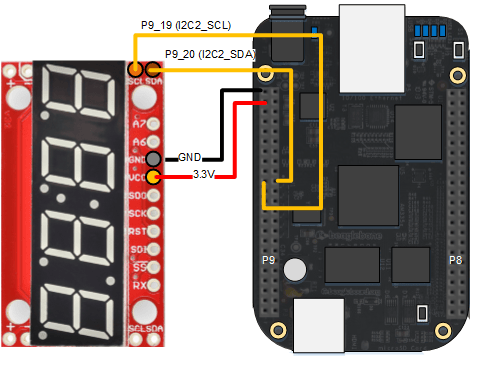
Control Four-Digit Seven-Segment Display Using I2C
Use the I2C peripheral on BeagleBone Black® hardware to control a four-digit seven-segment display.

