Structure of a 3D Scenario
R2026bScenarios created using the 3D Scenarios add-on are organized into several parts: a scene, actors, analyses, and viewers. The relationships between the parts determine how actors appear, move, and interact during simulation.
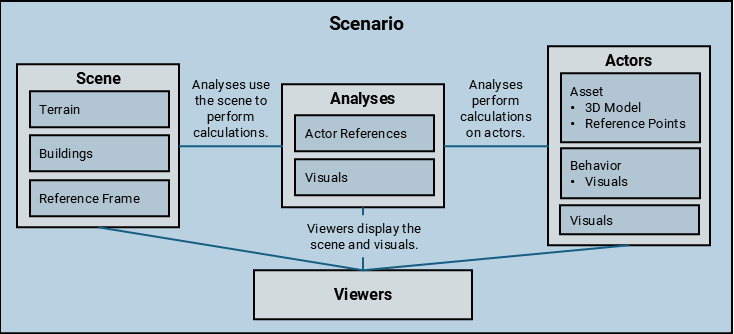
This diagram shows the parts of a scenario and some relationships between the parts.
Scene
The scene represents the geographic environment for the scenario,
including terrain and buildings. The scene also stores a default reference frame, based on
WGS84, that functions such as pose use to
interpret position and orientation data. The scenario represents the scene using a Scene
object.
Query the scene by using the Scene property
of the Scenario object.
Actors
An actor represents a physical object within the scenario, such
as a vehicle, an aircraft, or a communication tower. The scenario represents actors using
Actor
objects.
An actor consists of an asset, a behavior, and visuals.
The asset stores the 3D model and the metadata for the actor. The asset also defines named reference points that functions such as
losAnalysisuse to identify locations on the 3D model. Find the asset for an actor by querying theAssetproperty of theActorobject.The behavior determines how the actor moves during simulation. For example, when you create an actor from a trajectory, the scenario creates a
FixedTrajectoryBehaviorobject that controls how the actor moves along the trajectory. An actor with no behavior is stationary. Find the behavior for an actor by querying theBehaviorproperty of theActorobject.The visuals control the appearance of the actor in the viewers. Each actor has one visual per open viewer. Find the visuals for an actor by querying the
Visualproperty of theActorobject.
Find the actors in a scenario by querying the Actors property
of the Scenario object.
Analyses
An analysis performs a calculation on one or more actors. For
example, a line-of-sight (LOS) analysis calculates whether an unobstructed path exists
between a source actor and one or more destination actors. The scenario represents analyses
using objects such as LOSAnalysis and
RayTraceAnalysis.
An analysis consists of actor references and visuals.
The actor references associate the analysis with one or more actors in the scenario. When an actor has an asset, the analysis identifies locations on the 3D model by using named reference points.
The visuals control the appearance of the analysis in the viewers. Each analysis has one visual per open viewer.
Analyses use the terrain, buildings, and 3D models of actors to perform calculations. For example, in an LOS analysis, a car actor can obstruct the LOS between two other actors.
Find the analyses associated with a scenario by using the analyses
function.
Viewers
A viewer is a 3D globe that displays the scene and the visuals
associated with actors, behaviors, and analyses. The scenario represents viewers using
GlobeViewer
objects.
You can create multiple viewers for the same scenario. Each actor, behavior, and
analysis has one visual per open viewer. When a scenario has multiple viewers, you can
access the visual for a specified viewer by using the getvisual
function.
Find the viewers associated with a scenario by using the viewers
function.

