Root Mean Square (RMS Block) Code Replacement
R2026bThis example shows how to replace the code generated from the RMS (DSP System Toolbox) block with a custom root mean square (RMS) function. Replacing the generated code with a custom function can optimize the generated code for your target execution environment.
Note
Code replacement supports replacement of the RMS (DSP System Toolbox) block from the DSP System Toolbox™. Other root mean square (RMS) blocks are not supported.
RMS Block Configurations
When you define a code replacement entry for the RMS block, you must specify a conceptual representation function prototype that corresponds to these characteristics of the RMS block:
The data type of the input, which can be
singleordoubleand real or complex.The dimensions of the input, which can be scalar, vector, or a matrix. You can specify the dimensions as either:
A range of sizes by using a two-row matrix, for example,
[1 1 1; inf inf inf].A specific size by using a vector, for example,
[20, 30,
                      40]
.
The dimension over which the block calculates the RMS value, which is specified by the block parameter Find the RMS value over.
Code replacement does not support RMS blocks if you select the Running RMS parameter.
This table shows the function prototype to use according to the dimension over which the block finds the RMS value.
| Find the RMS value over | Conceptual Function Signature | Arguments | Example Function Prototypes |
|---|---|---|---|
Entire input | y1 = rms(u1) |
| single y1 = rms(single u1[1 1 1; inf inf inf]) matches
RMS blocks that calculate the value over the entire input of a
three-dimensional matrix. |
Each column | y1 = rms(u1, u2) |
| single y1[1 1 1; 1 inf inf] = rms(single u1[1 1 1; inf inf
inf]) matches RMS blocks that calculate the value over
each column of a three-dimensional matrix. |
Each row | single y1[1 1 1; inf 1 inf] = rms(single u1[1 1 1; inf inf inf],
single u2) matches RMS blocks that calculate the value
over each row of a three-dimensional matrix. | ||
Specified dimension |
|
Replace Code From RMS Blocks
Create and register a code replacement library that replaces code generated from RMS blocks.
Open the programmatic interface from the MATLAB menu by selecting New > Function.
Create a table.
Create a function with the name of your code replacement library table that does not have arguments and returns a table object. You can use this function to call your code replacement library table.
Create a table object by calling
RTW.TflTable.
function hTable = crl_rms_blocks
% Create a function to call the code replacement library table

%% Create a table object
hTable = RTW.TflTable;
Create an entry by calling the function
createCRLEntry. Specify these arguments:The code replacement table object.
A function prototype for the conceptual representation of the RMS blocks to replace.
A function prototype for the implementation function that replaces the RMS block code.
For this example, replace the code for RMS blocks that perform the calculation over the entire input of a three-dimensional matrix with the custom function
rms_all.function hTable = crl_rms_blocks % Create a code replacement library table %% Create a table object hTable = RTW.TflTable; %% Create an entry hEntry = createCRLEntry(hTable,... "single y1 = rms(single u1[1 1 1; inf inf inf])",... "single y1 = rms_all(single* u1)");
Create entry parameters. Because this example replaces a function, create entry parameters by calling the function
setTflCFunctionEntryParameters. For this example, specify the implementation header filerms_all.h.function hTable = crl_rms_blocks % Create a code replacement library table %% Create a table object hTable = RTW.TflTable; %% Create an entry hEntry = createCRLEntry(hTable,... "single y1 = rms(single u1[1 1 1; inf inf inf])",... "single y1 = rms_all(single* u1)"); %% Create entry parameters hEntry.setTflCFunctionEntryParameters("ImplementationHeaderFile","rms_all.h");
Add the entry to the table by calling
addEntry.function hTable = crl_rms_blocks % Create a code replacement library table %% Create a table object hTable = RTW.TflTable; %% Create an entry hEntry = createCRLEntry(hTable,... "single y1 = rms(single u1[1 1 1; inf inf inf])",... "single y1 = rms_all(single* u1)"); %% Create entry parameters hEntry.setTflCFunctionEntryParameters("ImplementationHeaderFile","rms_all.h"); %% Add entry to the table addEntry(hTable,hEntry);
Validate and save the customization file. From the MATLAB menu, save this customization file by selecting File > Save. From the command line, validate the code replacement library table by calling it:
hTable = crl_rms_blocks
Register the code replacement library. Registration creates a code replacement library by defining the library name, code replacement tables, and other information. Create a registration file (a new function file) with these specifications:
function rtwTargetInfo(cm)

cm.registerTargetInfo(@loc_register_crl);
end

function this = loc_register_crl

this(1) = RTW.TflRegistry;
this(1).Name = 'CRLRMSBlocks';
this(1).TableList = {'crl_rms_blocks.m'}; % table created in this example
this(1).TargetHWDeviceType = {'*'};
this(1).Description = 'Example code replacement library';

end
To use your code replacement library, refresh your current MATLAB session with the command:
sl_refresh_customizations
Verify the code replacement library. From the MATLAB command line, open the library by using the Code Replacement Viewer and verify that the table and entry are correctly specified. For more information, see Verify Code Replacement Library. Configure your model to use the code replacement library, generate code, and verify that code replacement occurs as expected. If unexpected behavior occurs, examine the hit and miss logs to troubleshoot the issues.
Example RMS Block Code Replacement
This example shows code replacement for a model that contains RMS blocks that use a variety of data types and dimensions.
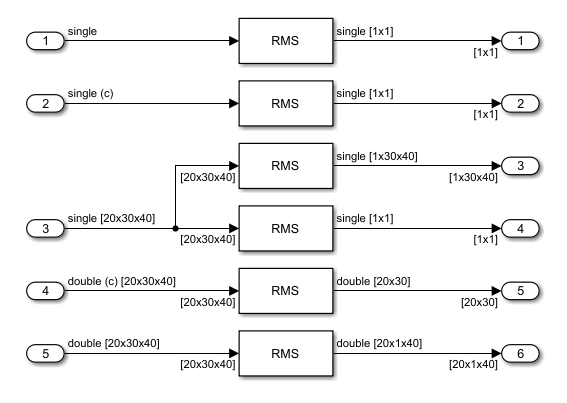
This code replacement library replaces the RMS code with custom RMS functions.
function hLib = crl_rms_blocks
    %   Copyright 2025 The MathWorks, Inc.

    hLib = RTW.TflTable;

    % 3 Dimensional Single Matrix, Calculate Over Entire Input
    hEntry = hLib.createCRLEntry("single y1 = rms(single u1[1 1 1; inf inf inf])", ...
        "single y1 = rms_s_n_n_n_all(single* u1)");
    setTflCFunctionEntryParameters(hEntry,"ImplementationHeaderFile", "rms_s_n_n_n_all.h");
    addEntry(hLib,hEntry);

    % 3 Dimensional Single Matrix, Calculate Over Dimension 1 (Each Column)
    hEntry = hLib.createCRLEntry("single y1[1 1 1; 1 inf inf] = rms(single u1[1 1 1; inf inf inf], single u2)", ...
        "void rms_s_n_n_n_dim1(single* y1, single* u1, single u2)");
    setTflCFunctionEntryParameters(hEntry,"ImplementationHeaderFile", "rms_dim1.h");
    addEntry(hLib,hEntry);

    % 3 Dimensional Double Matrix, Calculate Over Dimension 2 (Each Row)
    hEntry = hLib.createCRLEntry("double y1[1 1 1; inf 1 inf] = rms(double u1[1 1 1; inf inf inf], double u2)", ...
        "void rms_d_n_n_n_dim2(double* y1, double* u1, double u2)");
    setTflCFunctionEntryParameters(hEntry,"ImplementationHeaderFile", "rms_d_n_n_n_dim2.h");
    addEntry(hLib,hEntry);

    % 3 Dimensional Complex Double Matrix, Calculate Over Dimension 3
    hEntry = hLib.createCRLEntry("double y1[1 1; inf inf] = rms(cdouble u1[1 1 1; inf inf inf], double u2)", ...
        "void rms_cd_n_n_n_dim4(double* y1, cdouble* u1, double u2)");
    setTflCFunctionEntryParameters(hEntry,"ImplementationHeaderFile", "rms_cd_n_n_n_dim3.h");
    addEntry(hLib,hEntry);

    % Real Single Scalar
    hEntry = hLib.createCRLEntry("single y1 = rms(single u1)",...
        "single y1 = rms_real_scalar(single u1)");
    setTflCFunctionEntryParameters(hEntry,"ImplementationHeaderFile","rms_real_scalar.h");
    addEntry(hLib,hEntry);

    % Complex Single Scalar
    hEntry = hLib.createCRLEntry("single y1 = rms(csingle u1)", ...
        "single y1 = rms_complex_scalar(csingle u1)");
    setTflCFunctionEntryParameters(hEntry,"ImplementationHeaderFile", "rms_complex_scalar.h");
    addEntry(hLib,hEntry);

end
This registration file registers the code replacement library.
function rtwTargetInfo(cm)

cm.registerTargetInfo(@loc_register_crl);
end

function this = loc_register_crl

this(1) = RTW.TflRegistry;
this(1).Name = 'CRLRMSBlocks';
this(1).TableList = {'crl_rms_blocks.m'};
this(1).TargetHWDeviceType = {'*'};
this(1).Description = 'Example code replacement library';

end
To generate code that uses the custom RMS functions:
Register the code replacement library by entering
sl_refresh_customizationsat the command line.sl_refresh_customizations
Configure the model to use the code replacement library. In the model configuration parameters dialog box, on the Interface pane, set Code Replacement Library by clicking Select and adding
CRLRMSBlocksto the Selected code replacement libraries - prioritized list pane.Generate code from the model.
The generated code contains these calls to custom replacement functions.
void rms_basic_step(void)
{
  /* Outport: '<Root>/Out7' incorporates:
   *  Inport: '<Root>/In1'
   *  S-Function (sdspstatfcns): '<Root>/RMS6'
   */
  rms_s_n_n_n_dim1(&rms_basic_Y.Out7[0], &rms_basic_U.In1[0], 1.0F);

  /* Outport: '<Root>/Out17' incorporates:
   *  Inport: '<Root>/In7'
   *  S-Function (sdspstatfcns): '<Root>/RMS16'
   */
  rms_d_n_n_n_dim2(&rms_basic_Y.Out17[0], &rms_basic_U.In7[0], 2.0);

  /* Outport: '<Root>/Out8' incorporates:
   *  Inport: '<Root>/In3'
   *  S-Function (sdspstatfcns): '<Root>/RMS7'
   */
  rms_cd_n_n_n_dim4(&rms_basic_Y.Out8[0], &rms_basic_U.In3[0], 3.0);

  /* Outport: '<Root>/Out1' incorporates:
   *  Inport: '<Root>/In1'
   *  S-Function (sdspstatfcns): '<Root>/RMS'
   */
  rms_basic_Y.Out1 = rms_s_n_n_n_all(&rms_basic_U.In1[0]);

  /* Outport: '<Root>/Out16' incorporates:
   *  Inport: '<Root>/In6'
   *  S-Function (sdspstatfcns): '<Root>/RMS15'
   */
  rms_basic_Y.Out16 = rms_complex_scalar(rms_basic_U.In6);

  /* Outport: '<Root>/Out15' incorporates:
   *  Inport: '<Root>/In5'
   *  S-Function (sdspstatfcns): '<Root>/RMS14'
   */
  rms_basic_Y.Out15 = rms_real_scalar(rms_basic_U.In5);
}
See Also
RMS (DSP System Toolbox) | RTW.TflTable | createCRLEntry

