Improve Performance of Edge Detection Algorithm Using Automatic Parallelization
R2026bThis example is designed to perform edge detection on a 2D image using a custom filter. It highlights the performance improvement that comes from using automatic parallelization of for-loops, which is enabled by default in MATLAB® Coder™.
MATLAB Coder uses the OpenMP standard for parallel programming to efficiently distribute computations across multiple threads on a single machine. This parallelization leverages shared memory architecture to significantly speed up processing time. For more information on the parallel programming capabilities of OpenMP, see The OpenMP API Specification for Parallel Programming.
Prerequisites
To allow parallelization, ensure that your compiler supports the OpenMP. If the compiler does not support OpenMP, the code generator generates serial code.
To run the software-in-the-loop (SIL) verification mode, you must have an Embedded Coder license.
View Image and Filter Algorithm
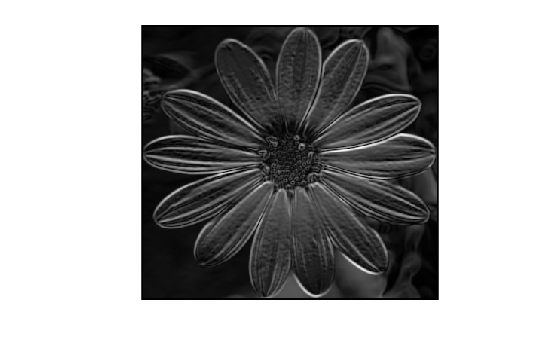
The edge detection algorithm edgeDetectionOn2DImage.m applies a Sobel filter to the input image flower.jpg. The for-loop computes the gradient magnitude at each pixel by applying the input filter. The resulting image is normalized to a range of 0 to 255 for display.
Display the input image flower.jpg.
imshow("flower.png")
Display the MATLAB® code for edgeDetectionOn2DImage.
type edgeDetectionOn2DImage% This function accepts an image and a filter and returns an
% image with the filter applied on it.
function filteredImage = edgeDetectionOn2DImage(original2DImage, filter)
%#codegen
arguments
original2DImage (:,:) double
filter (:,:) double
end
%% Algorithm for convolution
% Initialize
filteredImage = zeros(size(original2DImage));
[rows, cols] = size(original2DImage);
filterSize = size(filter);
% Apply filter on input image through windowing technique
for i = 3:rows-2
for j = 3:cols-2
% Compute the gradient components
Gx_component = 0;
Gy_component = 0;
for u = 1:filterSize(1)
for v = 1:filterSize(1)
pixel_value = original2DImage(i+u-3, j+v-3);
Gx_component = Gx_component + filter(u, v) * pixel_value;
Gy_component = Gy_component + filter(u, v+filterSize(1)) * pixel_value;
end
end
% Compute the gradient magnitude
filteredImage(i, j) = hypot(Gx_component, Gy_component);
end
end
% Normalize the output image
maxPixel = max(filteredImage,[], 'all');
filteredImage = uint8(255 * (filteredImage / maxPixel));
end
Generate Parallel C Code
Generate parallel C code for the edgeDetectionOn2DImage function.
% Load the image and convert to gray-scale for processing
image = double(rgb2gray(imread("flower.png")));

% Define the Edge Detection Filter
filter = [-2 -1 0 1 2 -2 -2 -4 -2 -2;
          -2 -1 0 1 2 -1 -1 -2 -1 -1;
          -4 -2 0 2 4  0  0  0  0  0;
          -2 -1 0 1 2  4  1  2  1  1;
          -2 -1 0 1 2  5  2  4  2  2];

cfg = coder.config("lib");
cfg.VerificationMode = "SIL";
codegen edgeDetectionOn2DImage -args {image,filter} -config cfg -report
Code generation successful: To view the report, open('codegen\lib\edgeDetectionOn2DImage\html\report.mldatx')
You can view the generated code by clicking View report. The OpenMP pragmas in the file edgeDetectionOn2DImage.c indicate parallelization of the for-loop.
To display the output image with filter applied, run the generated SIL MEX edgeDetectionOn2DImage_sil.
out = edgeDetectionOn2DImage_sil(image,filter);
### Starting SIL execution for 'edgeDetectionOn2DImage'
    To terminate execution: clear edgeDetectionOn2DImage_sil
View the output image.
imshow(out)
Verify Numerical Correctness
You can verify the numerical correctness of the generated code by comparing its output with the MATLAB code output. Use the isequal function to compare their outputs.
isequal(edgeDetectionOn2DImage(image,filter),edgeDetectionOn2DImage_sil(image,filter))
ans = logical
   1
The returned value 1 (true) verifies that the generated code behaves the same as the MATLAB code.
You can also compare the generated code with the MATLAB code for a specific target hardware by setting the configuration option VerificationMode to PIL.
Compare Performance
You can compare the performance using coder.perfCompare of the code generated with automatic parallelization enabled and disabled along with MATLAB. These results are achieved when this example is run on a 12-core 64-bit Windows® platform.
Run these commands using the image and filter as defined above.
cfgOff = coder.config("lib");
cfgOff.VerificationMode = "SIL";
cfgOff.EnableAutoParallelization = false;

cfgOn = coder.config("lib");
cfgOn.VerificationMode = "SIL";

coder.perfCompare("edgeDetectionOn2DImage",1,{image,filter},{cfgOff,cfgOn}, ...
ConfigNames={"Automatic Parallelization Disabled","Automatic Parallelization Enabled"},CompareWithMATLAB=true);
==== Running (edgeDetectionOn2DImage, MATLAB) ====
- Running MATLAB script.
TimingResult with 21 Runtime Sample(s)

Statistical Overview:
   mean = 2.39e-02 s    max = 3.30e-02 s     sd = 3.66e-03 s
 median = 2.35e-02 s    min = 1.87e-02 s   90th = 2.82e-02 s

==== Running (edgeDetectionOn2DImage, Automatic Parallelization Disabled) ====
- Generating code and building SIL MEX.
- Running SIL MEX.
TimingResult with 109 Runtime Sample(s)

Statistical Overview:
   mean = 4.62e-03 s    max = 6.37e-03 s     sd = 3.76e-04 s
 median = 4.47e-03 s    min = 4.17e-03 s   90th = 5.07e-03 s

==== Running (edgeDetectionOn2DImage, Automatic Parallelization Enabled) ====
- Generating code and building SIL MEX.
- Running SIL MEX.
TimingResult with 347 Runtime Sample(s)

Statistical Overview:
   mean = 1.44e-03 s    max = 2.78e-03 s     sd = 2.47e-04 s
 median = 1.37e-03 s    min = 9.35e-04 s   90th = 1.66e-03 s

                                 MATLAB                             Automatic Parallelization Disabled                                               Automatic Parallelization Enabled
                              _____________    _____________________________________________________________________________    ____________________________________________________________________________
                              Runtime (sec)    Runtime (sec)    Speedup: MATLAB / Automatic Parallelization Disabled (times)    Runtime (sec)    Speedup: MATLAB / Automatic Parallelization Enabled (times)
                              _____________    _____________    ____________________________________________________________    _____________    ___________________________________________________________
    edgeDetectionOn2DImage      0.023512         0.0044746                                 5.2547                                 0.0013727                                17.129
The results from coder.perfCompare show that the code generated with automatic parallelization disabled runs approximately 4 times faster than the MATLAB code. However, the code generated with automatic parallelization enabled runs approximately 20 times faster than the MATLAB code.

