Create User-Defined Coding Standard by Using Polyspace Query Language
R2026bA user-defined coding standard is a collection of coding rules that you curate to check
for bugs and defects that are relevant to your project. To create a user-defined coding
standard, select the rules in which you are interested. Map your coding rules to existing
Polyspace®
Bug Finder™ checkers. If there is no good mapping, define your own defect using Polyspace
Query Language (PQL). Finally, create the user defined coding standard by encoding your new
rules and mapping in PQL.
This topic shows how to create a user-defined coding standard once you have the mapping between the coding rules in the user-defined coding standard and existing Bug Finder checkers. To learn how to create the mapping, see Find Polyspace Bug Finder Checkers That Map to Coding Rules in User-Defined Coding Standard. This topic assumes familiarity with PQL syntax. For details about PQL syntaxes, see: Create Checkers.
Design User-Defined Coding Standard
Before implementing your own coding standard, design the coding standard so that reviewing results from the coding standard is convenient and logical. For the best practices, see Best Practices for Creating User-Defined Coding Standards.
In your design:
Specify the Bug Finder checkers you want to include.
Specify the user-defined defects that you want to create or reuse.
Gather related rules in to sections.
In addition to sections, classify the rules into categories and subsets for ease of use.
For example, this table summarizes the design of a user-defined coding standard. Related rules are classified into different sections. Each rule is assigned an Id. The Id is the identifier of a rule during result review. Rules in a specific category or subset can be enabled together. For easier configuration, the rules in the standard is further classified into categories and subsets.
| Section | Id | Description | Bug Finder Checker | Category | Subset |
|---|---|---|---|---|---|
| Class | C.4 | Make a function a member only if it needs direct access to the representation of a class | AUTOSAR C++14
Rule M9-3-3 | Cat-1 | Subset A |
| Class | C.22 | Make default operations consistent | Move
operation uses copy, AUTOSAR C++14
Rule A12-8-1, AUTOSAR C++14
Rule A12-1-1 | Cat-1 | Subset A |
| Move Semantics | Move_1 | A move operation may throw | A move
operation may throw | Cat-2 | Subset A |
| Move Semantics | Move_2 | Move operation uses copy | Move
operation uses copy | Cat-2 | Subset A, Subset B |
| Move Semantics | Move_3 |
| Const
std::move input may cause a more expensive object copy | Cat-2 | Subset A, Subset B |
| Container | Container_1 | Expensive use of map instead of
set | Expensive use
of map instead of set | Cat-3 | Subset A, Subset B |
| Container | Container_2 | Expensive use of map's bracket operator to insert or assign a value | Expensive use
of map's bracket operator to insert or assign a value | Cat-3 | Subset A, Subset B |
| Syntax | Syntax1 | Do not use assignment operation as condition for if and
while | No existing checker. Create as a user-defined defect. | Cat-2 | Subset C |
| Syntax | Syntax2 | Integer variable names must indicate signedness and size | No existing checker. Create as a user-defined defect. | Cat-2 | Subset C |
Related rules are classified into different sections. Each rule is assigned
an Id. The Id is the identifier of a rule during
result review. Rules in a specific category or subset can be enabled together. For easier
configuration, the rules in the standard is further classified into categories and
subsets.
Initialize User-Defined Coding Standard
Create a folder called myStandard in a writable location. Open a
command-line terminal in this folder and
enter:
polyspace-query-language init
main.pql and pql.json is created in the folder. The
pql.json file is a configuration object that Polyspace uses when compiling the standard. You do not need to edit this file in this
example. The main.pql file contains the code that packages the rules and
user-defined defects into a .pschk file. Open main.pql
and verify that the file contains package main as the first line and then
contains an empty definition of a catalog named
myStandard.Create Folder Structure
Create folders corresponding to each section in the standard. Code for the sections are
created in each of these child folders. Each folder correspond to a
package, which contains the section element. These
elements are then assembled in main.pql. Because the
package elements are defined in child folders of
myStandard, Polyspace assumes that each of these package element is part of the
main package. The complete folder structure for the standard looks like this:
To create this folder structure in the command line, navigate to
myStandard and
enter:
mkdir Class Move_Semantics Container Naming_Convention
Create Rules and Sections
In the folder Class, create new text files C_4.pql
and C_22.pql in your preferred text editor or IDE. These files implement
the rules with the identifier C_4 and C_22 in the preceding table. This code defines the
rule element C_4 and maps it to AUTOSAR C++14 Rule
M9-3-3:
package Class
#[Description ("Make a function a member only if it needs direct access to the representation of a class"), Id(C_4), Lang(C++), Category("Cat-1"), Subsets("Subset A") ]
rule C_4 = {
  std.autosar_cpp14.M9_3_3
}The
Descriptionannotation specifies the UI label for the rule.The
Idannotation specifies the short name for this rule.The
langannotation specifies that this rule applies to C++ only.The
Categoryannotation specifies that this rule belongs to the categoryCat-1.The
Subsetsannotation specifies that this rule belongs to the subset A.std.autosar_cpp14.M9_3_3is the PQL name of the checkerAUTOSAR C++14 Rule M9-3-3. The PQL name of a checker is documented in the Check Information section of the checker reference page.
Similarly, define the rule element C_22
in the file
Class/C_22.pql:
package Class
#[Description ("Make default operations consistent"), Id(C_22), Lang(C++), Category("Cat-1"), Subsets("Subset A") ]
rule C_22 = {
  std.defects.MOVE_OPERATION_USES_COPY,
  std.autosar_cpp14.A12_8_1,
  std.autosar_cpp14.A12_1_1
}rule elements, create the
section element that contains these rule elements in
Class/Class.pql. Because the rule elements and
section elements are in the same package, the
element C_4 and C_22 are available for use in
Class/Class.pql:// Class/Class.pql
package Class
#[Description ("Class")]
section Class = {
C_4,
C_22
}For the other section, create the rules in their own .pql files in
the respective folders and then use the rule elements to create the
section elements:
Create the rule Container_1 in
myStandard/Container/Container_1.pql:package Container #[Description ("Expensive use of map instead of set"), Id(Container_1), Lang(C++), Category("Cat-3"), Subsets("Subset A", "Subset B")] rule Container_1 = { std.defects.EXPENSIVE_USE_OF_MAP_INSTEAD_OF_SET }Create the rule Container_2 in
myStandard/Container/Container_2.pql:package Container #[Description ("Expensive use of map's bracket operator to insert or assign a value"), Id(Container_2), Lang(C++), Category("Cat-3"), Subsets("Subset A", "Subset B")] rule Container_2 = { std.defects.EXPENSIVE_MAP_INSERT_OR_ASSIGN }Create the section Container in
myStandard/Container/Container.pqlpackage Container #[Description ("Container")] section Container = { Container_1, Container_2 }Create the rule Move_1 in
myStandard/Move_Semantics/Move_1.pql:package MoveSemantics #[Description ("Move operation may throw"), Id(Move_1), Lang(C++), Category("Cat-2"), Subsets("Subset A")] rule Move_1 = { std.defects.MOVE_OPERATION_MAY_THROW }Create the rule Move_2 in
myStandard/Move_Semantics/Move_2.pql:package MoveSemantics #[Description ("Move operation uses copy"), Id(Move_2), Lang(C++), Category("Cat-2"), Subsets("Subset A", "Subset B")] rule Move_2 = { std.defects.MOVE_OPERATION_USES_COPY }Create the rule Move_3 in
myStandard/Move_Semantics/Move_3.pql:package MoveSemantics #[Description ("Const std::move input may cause a more expensive object copy"), Id(Move_3), Lang(C++), Category("Cat-2"), Subsets("Subset A", "Subset B")] rule Move_3 = { std.defects.EXPENSIVE_STD_MOVE_CONST_OBJECT }Create the section Move_Semantics in
myStandard/Move_Semantics/MoveSemantics.pqlpackage MoveSemantics #[Description ("Move Semantics")] section MS = { Move_1, Move_2, Move_3 }Create the rule
nameNotDescriptiveinmyStandard/Naming_Convention/nameNotDescriptive.pql:package NC #[Description ("Do not use single letter as a name"), Id(NC_1), Category("Cat-2"), Subsets("Subset C")] rule nameNotDescriptive = { defect inappropriateIntName = when Cpp.Variable.is(&var) and var.name(&varName) and var.type(&varType) and varType.isIntegral() and getPrefix(varType, &prefix) and not varName.startsWith(prefix) raise "Expected prefix: \"{prefix}\"" on var } predicate getPrefix(Cpp.Type.Type vartype, Lang.String &prefix) { return ((vartype.isSigned() and Lang.createString( "s", &str)) or (vartype.isUnsigned() and Lang.createString( "u", &str))) and vartype.sizeInBits(&nBits) and Lang.toString(nBits, &sizestr) and Lang.catString(str, sizestr, &prefix) }Create the section Naming_Convention in
myStandard/Naming_Convention/Naming_Convention.pqlpackage NC #[Description ("Naming Convention")] section VarName = { nameNotDescriptive }
Assemble Coding Standard
After defining the section elements, assemble the standard in
main.pql. Each section element is defined in a child package of the
main package. Use dot notation to place the sections in the catalog
myStandard:
package main

// Main PQL file defines the catalog of your PQL project.
// The catalog is a collection of sections.
#[Categories("Cat-3","Cat-2","Cat-1")]
catalog myStandard = {
  Class.Class,
  Container.Container,
  MoveSemantics.MS,
  NC.VarName

}
Create .pschk File
User defined coding standards are used by Polyspace as .pschk files. To create the Polyspace user-defined coding standard (.pschk) file, navigate to the
folder myStandard in the command line and
enter:
polyspace-query-language package .
myStandard.pschk in the folder myStandard.
You can open this coding standard in the Checkers Selection window.
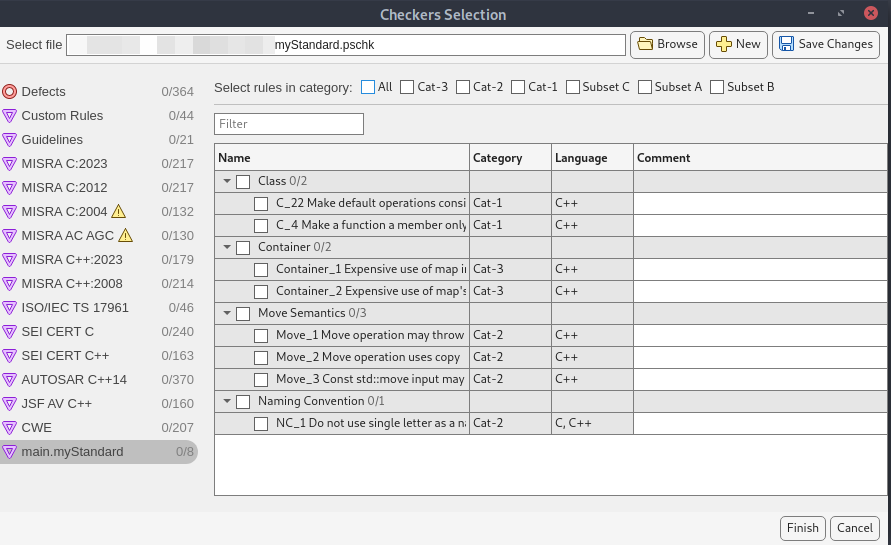
In this coding standard:
The section labels match the
Descriptionattribute defined in the PQL code.The rule name and identifiers correspond to the
DescriptionandIdattribute defined in the PQL code.The rules are classified into categories and subsets specified by
CategoryandSubsetsattributes of the rules.
After creating the .pschk file, you can share the file with other
Polyspace users in your organization.
To check for violations of the user-defined coding standard, use one of these methods:
Command line – Use the
.pschkfile as an input to the optionCheckers activation file (-checkers-activation-file).Polyspace Platform user interface – In the Configuration pane, select Static Analysis > Defects and Coding Standards. Enter the
.pschkfile in the Checkers activation file box.Polyspace as You Code™ – Specify the
.pschkfile in the Checkers Selection window. You can open the Checkers Selection window from your Polyspace as You Code extension. See Configure Checkers (Polyspace as You Code).
For more details about finding violations of the user-defined coding standard, see Check for Violations of User-Defined Coding Standard Using Polyspace Bug Finder.

