비행 계기
R2026b표준 조종석 계기를 통해 측정값 표시
애플리케이션에 비행 상태 정보(예: 고도 및 방향)를 표시하려면 MATLAB® 앱 디자이너의 조종석 계기 함수 및 속성 또는 계기판을 사용하십시오. 예를 들어, 이러한 함수와 속성 또는 계기판을 사용하여 표준 조종석의 외관과 느낌을 재현할 수 있습니다. 이러한 표준 조종석 계기들을 만드십시오. Aerospace Toolbox는 조종석 계기를 컴포넌트로 생성합니다. 관련 속성을 사용하여 이러한 조종석 계기 컴포넌트의 모양과 동작을 제어할 수 있습니다.
해당 함수는 uifigure 함수로 생성된 Figure에 대해서만 동작합니다. GUIDE 또는 figure 함수로 생성된 앱은 비행 계기 컴포넌트를 지원하지 않습니다. Aerospace Toolbox 라이선스가 있으면 MATLAB 앱 디자이너에서 비행 계기 계기판을 사용할 수 있습니다.
함수
uiaeroairspeed | Create airspeed indicator component |
uiaeroaltimeter | Create altimeter component |
uiaeroclimb | Create climb rate indicator component |
uiaeroegt | Create exhaust gas temperature (EGT) indicator component |
uiaeroheading | Create heading indicator component |
uiaerohorizon | Create artificial horizon component |
uiaerorpm | Create revolutions per minute (RPM) indicator component |
uiaeroturn | Create turn coordinator component |
속성
| AirspeedIndicator Properties | Control airspeed indicator appearance and behavior |
| Altimeter Properties | Control altimeter appearance and behavior |
| ArtificialHorizon Properties | Control artificial horizon appearance and behavior |
| ClimbIndicator Properties | Control climb indicator appearance and behavior |
| EGTIndicator Properties | Control exhaust gas temperature (EGT) indicator appearance and behavior |
| HeadingIndicator Properties | Control heading indicator appearance and behavior |
| RPMIndicator Properties | Control revolutions per minute (RPM) indicator appearance and behavior |
| TurnCoordinator Properties | Control turn coordinator appearance and behavior |
도움말 항목
- Create and Configure Flight Instrument Component and an Animation Object
Display data using any flight instrument function.
- Flight Instrument Components in App Designer
Display data using flight instrument gauges in App Designer.
추천 예제
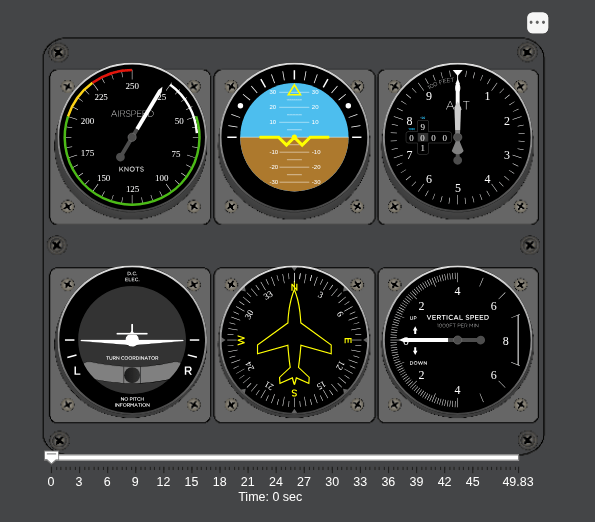
Display Flight Trajectory Data Using Flight Instruments and Flight Animation
Visualize flight trajectories in a UI figure window using flight instrument components.

앱 디자이너의 항공우주 비행 계기
앱 디자이너에서 Aerospace Toolbox 비행 계기를 사용하여 표준 조종석 계측 장비로 비행 상태 정보를 표시합니다.

